
Build a semantic layer for agentic AI on AWS with Strategy Mosaic and Amazon Bedrock AgentCore
This post is co-written with Zhili Cheng, Principal Product Manager, George Earle, Director, AI Engineering, and Kyler K, Sales Engineer of Strategy.
In the first post in this series, we built a semantic layer on AWS using Stardog’s knowledge graph over Amazon Aurora and Amazon Redshift and ran a Strands agent on Amazon Bedrock AgentCore against that layer. The second post kept the same customer 360 (C360) pattern and swapped in Denodo’s data virtualization platform, extending the source mix to include an on-premises PostgreSQL cluster. This post uses the same C360 pattern again, with Strategy Mosaic as the semantic layer.
Stardog’s semantic layer is ontology-based: concepts and relationships modeled as RDF, with IRIs as the unit of federation and SPARQL as the query language. Denodo’s is data virtualization: base and derived views composed in VQL. Mosaic’s is dimensional: attributes, hierarchies, facts, and metrics composed through Strategy’s metric expression syntax, with linked models as the unit of federation. That model serves four native protocols from one definition: Model Context Protocol (MCP) for AI agents, JDBC/ODBC over Trino for SQL clients, XMLA for Power BI and Excel, and REST for custom applications. Behind those protocols is a long list of certified data sources. Supported systems include cloud warehouses such as Snowflake and Databricks. Operational databases include Amazon Relational Database Service (Amazon RDS), Oracle, and SQL Server. Analytical engines include Amazon Athena, Trino, and SAP HANA, and software as a service (SaaS) sources include Salesforce. The linked-model pattern extends beyond the Amazon Redshift and Amazon Aurora pair this walkthrough uses. In this walkthrough, a Strands agent hosted on AgentCore runtime, a capability of Amazon Bedrock AgentCore, reaches Mosaic through the MCP endpoint. The joins, metric definitions, and per-caller row and column filters live inside Mosaic, not in the agent prompt.
We assume you’re familiar with the semantic-layer architecture from the first post in the series. If any of it is new, the Stardog post covers the ground.
By the end of this post, you will know:
- How to model a C360 domain in Strategy Mosaic across Amazon Redshift and Amazon Aurora using two linked models, with no ETL.
- How Mosaic’s metric syntax (base, advanced with named filter objects, level qualifiers, and compound) captures the business definitions the agent must reason over.
- How to expose the model to an AgentCore-hosted Strands agent through the Mosaic MCP server, and how user identity propagates so per-user Row-Level Security (RLS) and Object-Level Security (OLS) hold end-to-end.
- How to choose between live pushdown and in-memory execution for agent traffic.
- How to publish the same governed definitions to Power BI, Tableau, notebooks, and custom apps, and how to export them in Apache Ossie format for tools outside Mosaic.
The source of truth for the walkthrough is Strategy One (March 2026), the release when Mosaic access through the MCP server became available by default.
Strategy Mosaic terms used in this post
A short reference before we get to the model.
- Mosaic Schema and Mosaic Models. Two modeling paths within one universal semantic layer. Mosaic Schema is the centrally governed enterprise model. Mosaic Models is the self-service, AI-assisted modeling path in Mosaic Studio. Models can map to Schema attributes and inherit dimensions, object ACLs, and RLS. This walkthrough uses Mosaic Models.
- Model. The top-level artifact within either modeling path. Publishes attributes, metrics, hierarchies, and security rules over physical tables. The walkthrough uses two Mosaic Models, one over Amazon Redshift and one over Aurora, linked together.
- Attribute. A business entity such as Customer. Carries multiple forms: an ID form for joining and a display form for reading. Mosaic uses forms to resolve names like “Carolyn Inworth” to the underlying
cid. - Hierarchy. A parent-child relationship between attributes. Category rolls up through parent to Department. Address rolls up to City to State.
- Fact and metric. A fact is a numeric column. A metric aggregates it.
Purchase Amount = price * quantityis a base metric. Metrics can also be advanced (an aggregation qualified by a named condition) or compound (a formula over other metrics). - Filter object. A named condition referenced from metrics in angle brackets.
[Large Orders]is a filter whose qualification isPurchase Amount > 500. A metric references<[Large Orders]>without inlining the predicate. - Level qualifier. Metric expression syntax that pins aggregation grain.
{~+, !Customer+}sets the grain to Customer regardless of how the query is sliced. - Model linking. Composition across models on shared attributes (Customer, Time). Mosaic pushes aggregates to each source and joins intermediate results on the linking attributes.
- Certified model. Only certified models are reachable through the MCP server.
- Live or in-memory. Two per-model execution modes: live pushdown to the source, or answers from a Mosaic-resident cube. Details later in this post.
The example: Customer 360 across Amazon Redshift and Amazon Aurora
The C360 pattern from the first two posts stays in place. The schema is adapted from Stardog’s C360 Knowledge Kit, so a reader following the series sees the same entities, keys, and anchor question answered by a different semantic layer. A retail organization has customer records, addresses, credit cards, and rewards enrollment sitting on the operational side, and orders, products, and product categories sitting in the warehouse. Business users want answers that span both without knowing which system holds which fact.
Where this post differs is how Mosaic reaches the two sources. Mosaic does not federate rows across engines at query time. It plans one query per source, pushes native SQL down, and joins the intermediate result sets in the Mosaic engine on the shared attributes declared through model linking. The C360 walkthrough models the analytical side as a Purchase model over Amazon Redshift and the operational side as a Customer model over Amazon Aurora PostgreSQL-compatible edition.
The schema across the two databases:
Amazon Aurora PostgreSQL-compatible (operational)
| Table | Key columns |
customer |
cid (PK), first_name, last_name, email, ssn, phone, location |
address |
id (PK), city, state, zip, street_name |
credit_card |
id (PK), cid, card_num, card_type |
rewards_account |
id (PK), cid, account_id, create_date |
Amazon Redshift (analytical)
| Table | Key columns |
purchase |
id (PK), cid, pid, date, quantity, price, card |
product |
id (PK), name, brand, price, dept |
category |
id (PK), dept_name, parent |
vendor |
id (PK), vendor_name, industry |
The shared ID is cid, an integer that appears as the primary key in customer on Aurora and as a plain column in purchase on Amazon Redshift. There is no SQL constraint linking them, and there can’t be, because they live in different engines. Every question that joins a customer to their orders must reconcile that integer somewhere. Mosaic absorbs it through model linking rather than a materialized cross-engine join.
A representative question that exercises the whole model: Which of our top 20 customers by lifetime spend haven’t enrolled in the rewards program yet? This is the auto-enrollment question from the Denodo post. It needs customer profile from Aurora, aggregated spend from Amazon Redshift, and enrollment status from Aurora, ranked and filtered on definitions that live in the semantic layer.
Reference architecture
Figure 1 shows the end-to-end runtime. The inbound authentication path runs from the client through AgentCore Gateway, a capability of Amazon Bedrock AgentCore, and the runtime. The outbound query path runs from the Strands agent through the Mosaic MCP endpoint to Amazon Redshift and Amazon Aurora.
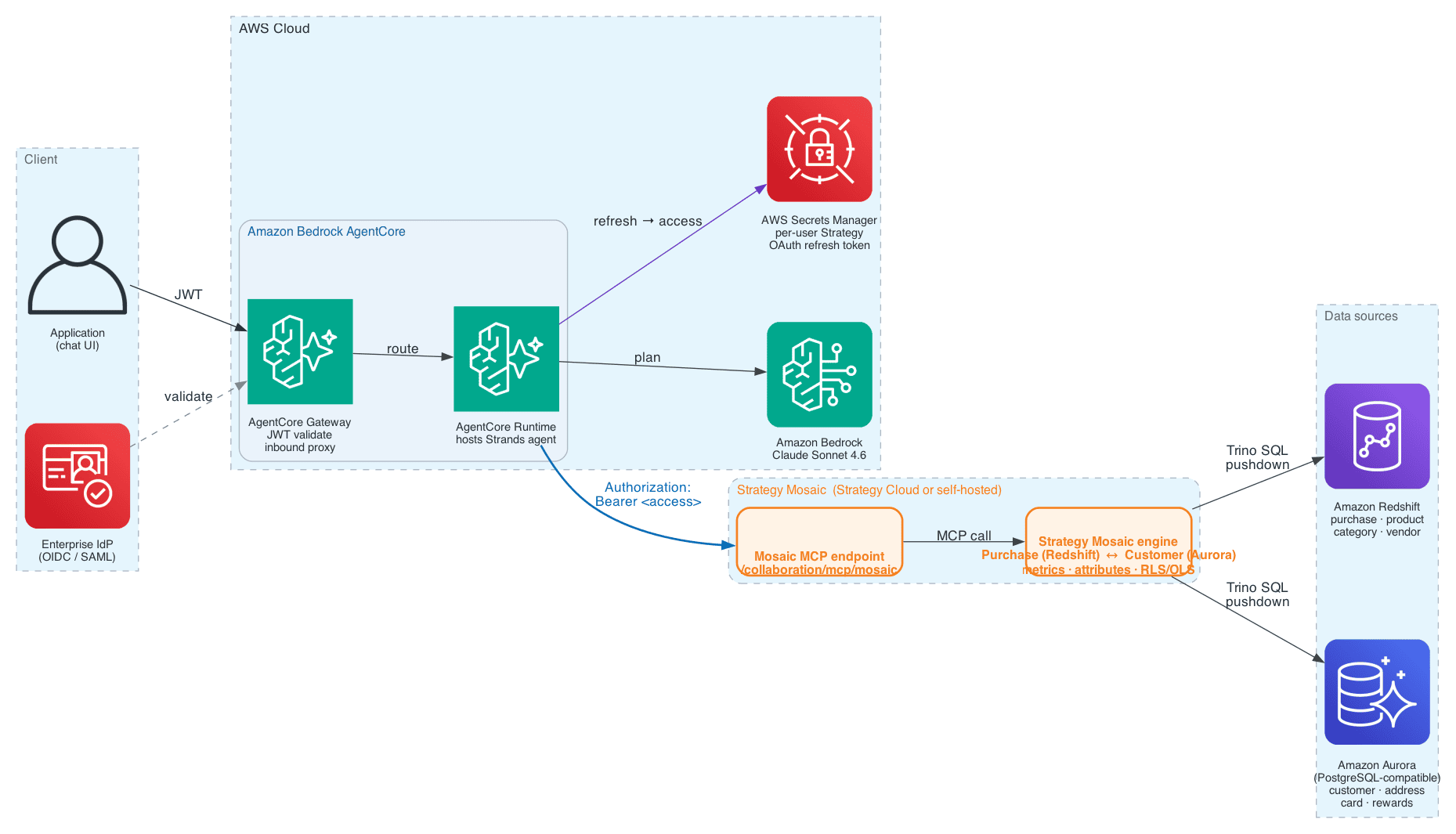
Figure 1: Reference architecture. Inbound authentication path and outbound query path between the client, Amazon Bedrock AgentCore components, the Strategy Mosaic MCP endpoint, the Mosaic engine, and Amazon Redshift plus Amazon Aurora.
The runtime splits into an inbound path and an outbound path.
Inbound. A client sends the user’s question through Amazon Bedrock AgentCore Gateway. Gateway validates the JSON Web Token (JWT) that identifies the human user against the enterprise identity provider (IdP). It then routes the request to Amazon Bedrock AgentCore runtime, which hosts the Strands agent. The agent invokes Anthropic Claude Sonnet 4.6 on Amazon Bedrock to interpret the prompt and plan the query.
Outbound. When the agent decides to query the semantic model, its MCP tool connects directly to the Mosaic MCP endpoint at https:// over HTTPS. The agent presents an OAuth 2.0 access token in the Authorization: Bearer header. Mosaic validates the token against its bundled OAuth authorization server and resolves the caller to a Strategy user. It then applies the Use MCP Server privilege and certified-model gate, evaluates row-level and column-level security for that user, and plans the query across the linked Purchase and Customer models. Amazon Redshift and Amazon Aurora respond to source-native SQL that the Mosaic engine emits per source.
Two properties matter for the rest of the walkthrough. Cross-source joins happen because a modeler declared a link, not because two sources happen to be reachable. The agent can only traverse links that exist in the model. The token that reaches Mosaic represents the human user, not a service account, so RLS and OLS evaluate against the caller’s identity end-to-end. AWS Secrets Manager holds the caller’s refresh token between calls, and the Governed access section walks the full identity chain.
Build the semantic layer
The walkthrough uses two Mosaic Models, the self-service AI-assisted modeling path in Mosaic Studio, linked on shared attributes. Mosaic Studio is the authoring suite, and the screenshots in this post come from its Design Center modeling workspace. Three passes: datasets and joins on each side, attributes and hierarchies, then metrics that carry the business logic. A team with an existing centrally governed Mosaic Schema can map the model’s attributes to it and inherit dimensions, object ACLs, and RLS from the enterprise schema without a parallel security review. Do this early if your data architects already maintain a governed schema.
Two linked models
Each Mosaic model connects to one live source. Model linking composes them.
- Purchase: Live against Amazon Redshift. Facts on the
purchasetable (price * quantity), dimensions onproduct,category,vendor, and the purchase date. - Customer: Live against Amazon Aurora PostgreSQL-compatible. Dimensions on
customer,address,credit_card,rewards_account.
Inside each model, the physical joins are declared once against the source schema. The Purchase model resolves purchase.pid = product.id, product.dept = category.id, and product.brand = vendor.id, plus a self-reference on category.parent = category.id for the department rollup. The Customer model resolves customer.location = address.id, customer.cid = credit_card.cid, and customer.cid = rewards_account.cid. These are the relationships Mosaic uses to plan the source-native SQL it pushes down. Nothing physical crosses between Purchase and Customer.
The two models link on Customer and Time. When a question needs both (for example top spenders in Wisconsin pulls state from address and spend from purchase), Mosaic pushes the appropriate aggregation to each source and combines the results on the linking attributes. No ETL, no third copy.
Domain ownership follows the model boundary. The CRM team owns Customer, and the data system team owns Purchase. Neither hands over its source. They agree on the linking attributes, and security propagates from the underlying models automatically. There’s no materialized cross-engine join and no shared physical schema between Amazon Redshift and Amazon Aurora. The join is the linking-attribute agreement.
Attributes and hierarchies
Attributes carry multiple forms. Customer uses cid as the ID form and first_name + last_name as the display form, so an agent can ask about “Carolyn Inworth” and Mosaic resolves it to the right key on both sides of the link. Figure 2 shows the Customer attribute authored in Mosaic Studio, with cid as the ID form and Full Name, First Name, and Last Name as display forms.
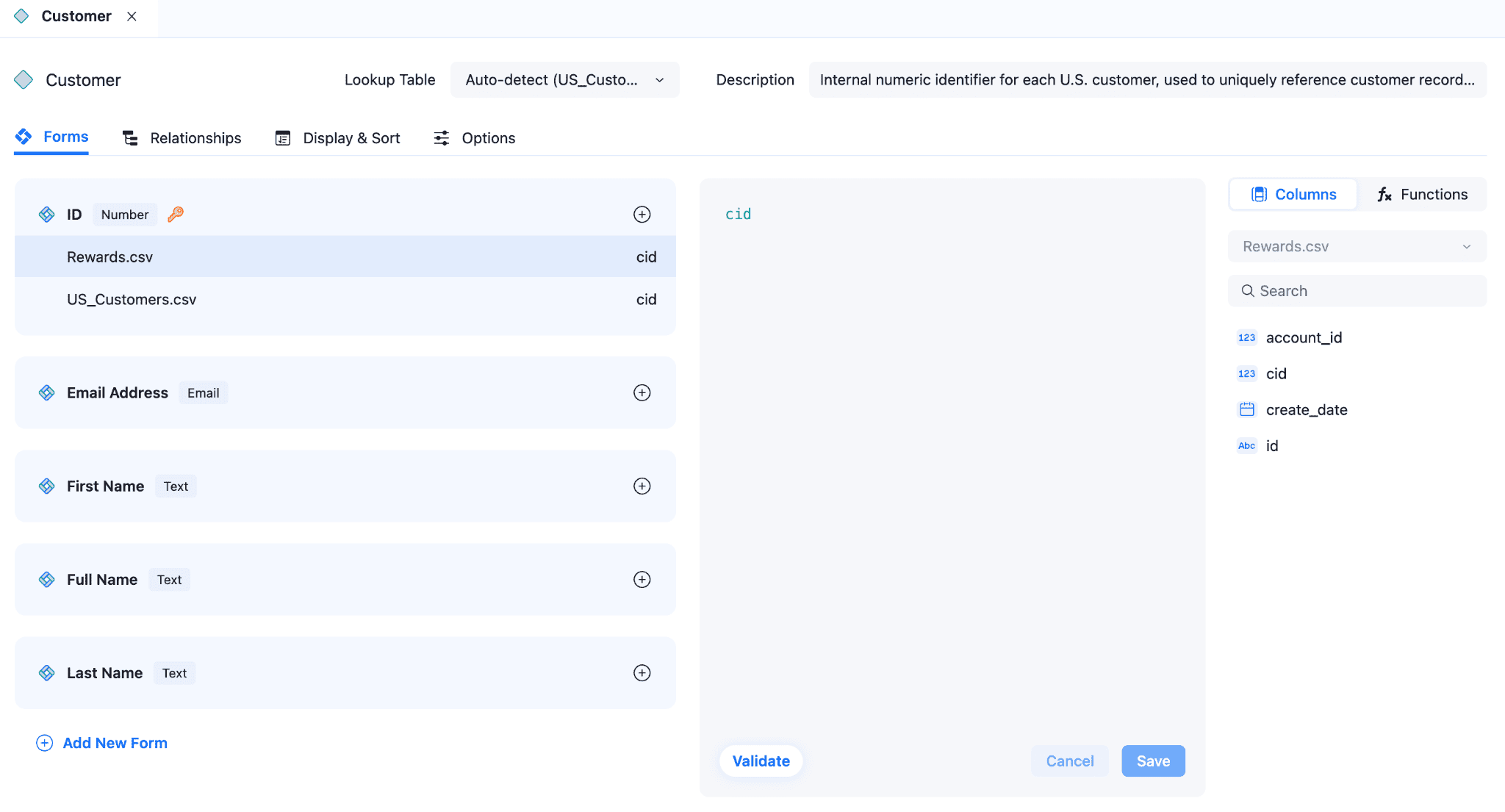
Figure 2: Customer attribute definition in Design Center. cid is the ID form used to join on the underlying key. Full Name, First Name, and Last Name are display forms.
Two hierarchies matter for C360:
- The Category hierarchy rolls up through parent to Department. The
category.parentself-reference means a department-level question aggregates consistently. - Address rolls up through City to State in the same pattern. That makes
State = 'WI'a single attribute qualification rather than a join the agent must construct.
Figure 3 shows the geography hierarchy authored in Design Center, chaining State through City and ZIP Code down to Customer.
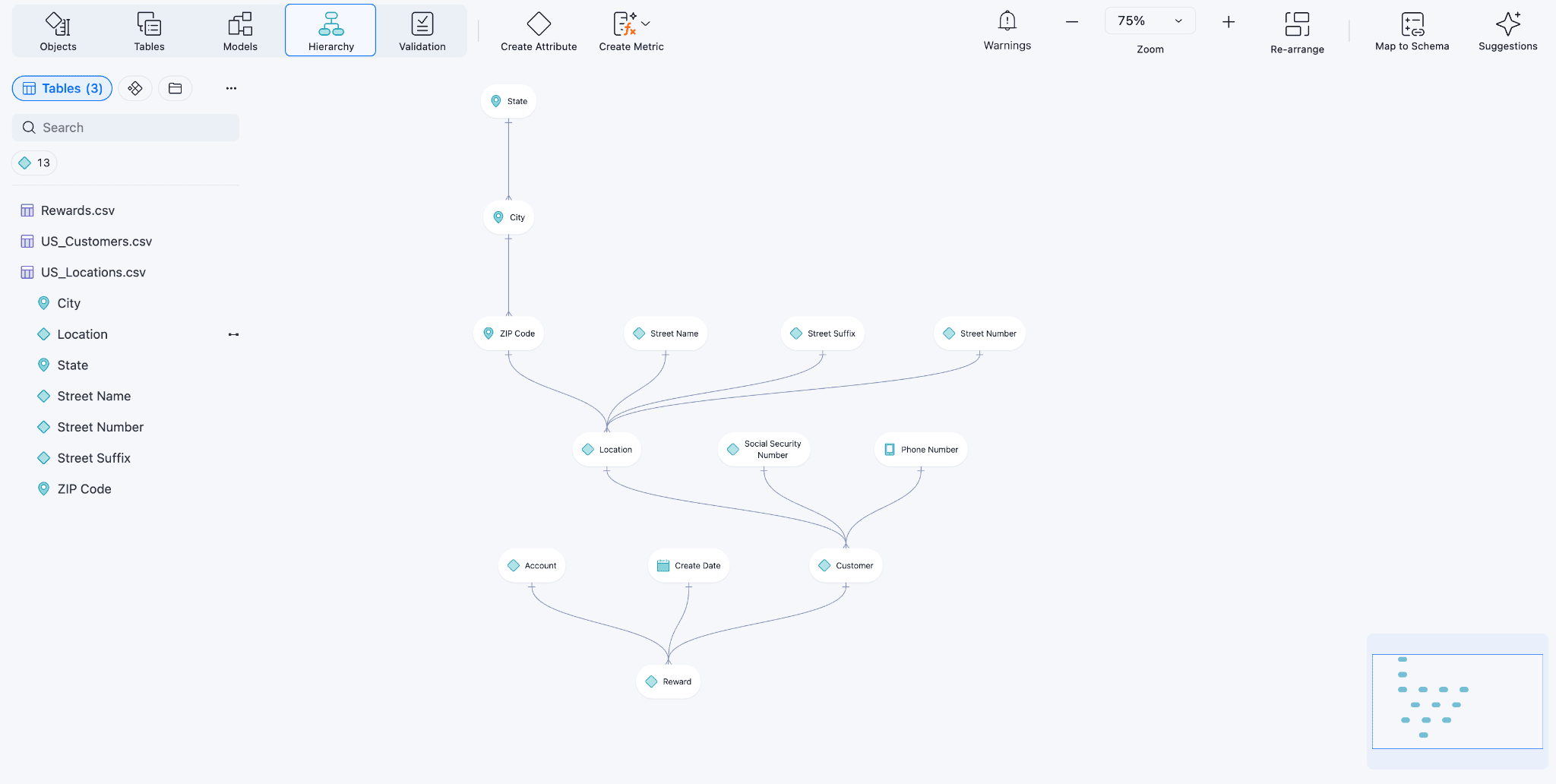
Figure 3: Geography hierarchy in Design Center for the Customer model. State rolls up through City and ZIP Code to Location, and Location links to Customer.
The agent asks for State = 'WI', not for address.state. Physical column names don’t leave the model. Every consumer of the semantic layer sees the attribute form and its display forms, and the hierarchy carries the rollup automatically.
Metrics: Base, advanced, compound, time-intelligence
A base metric applies a group function to a fact. Purchase Amount is Sum(price * quantity) on the purchase table.
Figure 4 shows the Purchase Amount base metric authored in Mosaic Studio: the formula Price * Quantity, with a description field that tells the agent what the metric means in business terms.
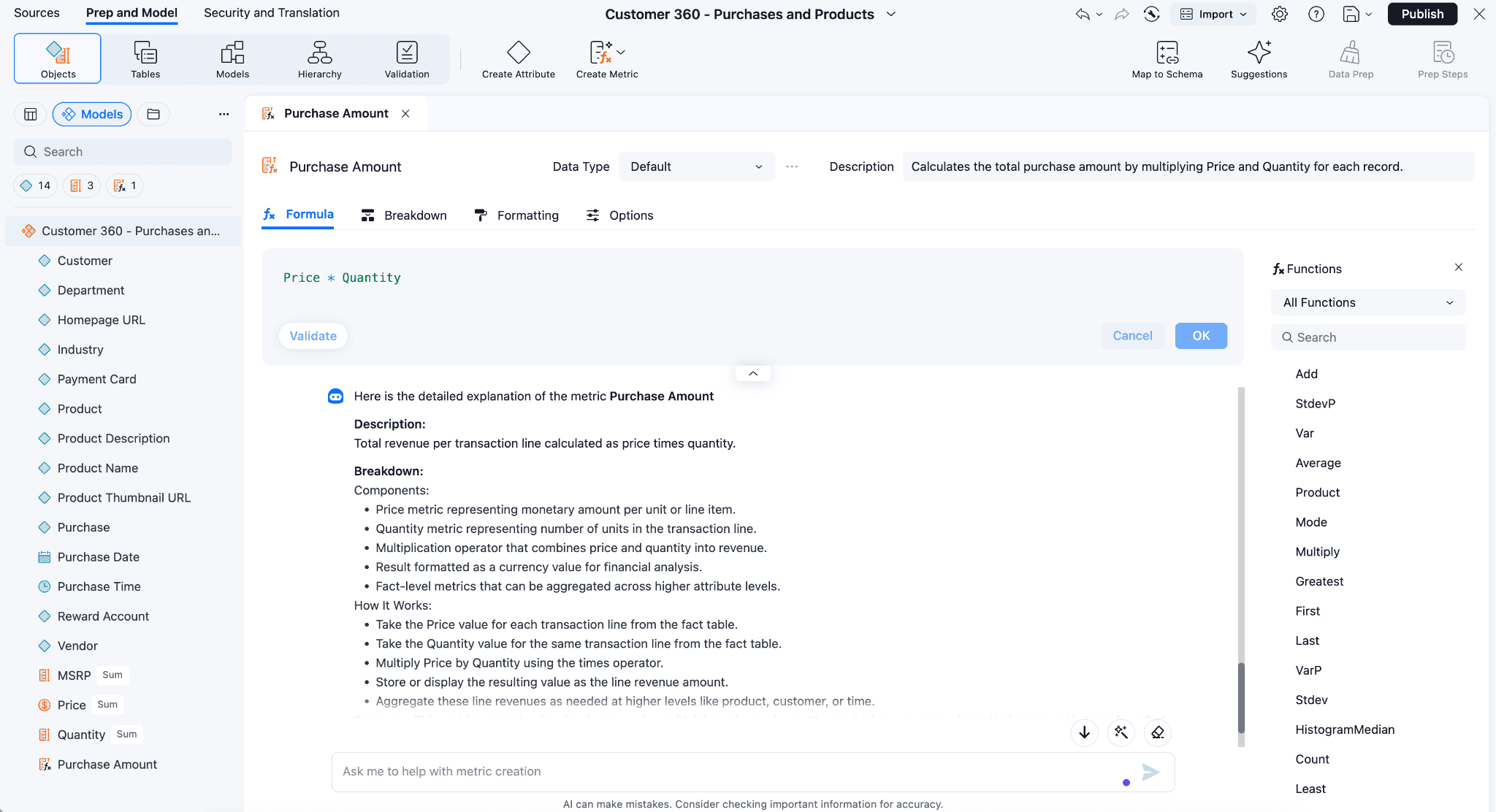
Figure 4: Purchase Amount metric authored in Design Center. The formula multiplies price by quantity, and the description tells the agent what the metric means in business terms.
The interesting C360 concepts are advanced metrics: an aggregation qualified by a named condition. In Strategy, conditions are references to filter objects in angle brackets, not inline predicates. Filter objects are model objects with their own name, description, and permissions, so they are reusable and auditable across metrics that share a definition.
Define the filters once:
| Filter object | Qualification |
[Large Orders] |
Purchase Amount > 500 |
[Sports Category] |
Category = "Sports" |
[Rewards Members] |
Rewards Account is not null |
[Card Present] |
Purchase Card is not null |
[Big Spender] |
Customer Lifetime Spend > 10000 |
Each filter object carries a name, description, qualification, and access permissions. The shape a modeler authors or exports for [Large Orders] looks like this:
Then reference the filters in metric expressions. Each of these is an advanced metric: a base aggregation qualified by a named filter.
Figure 5 shows the Design Center view of an advanced metric with a filter condition applied. It uses the same authoring pattern as the preceding Large Order Spend.
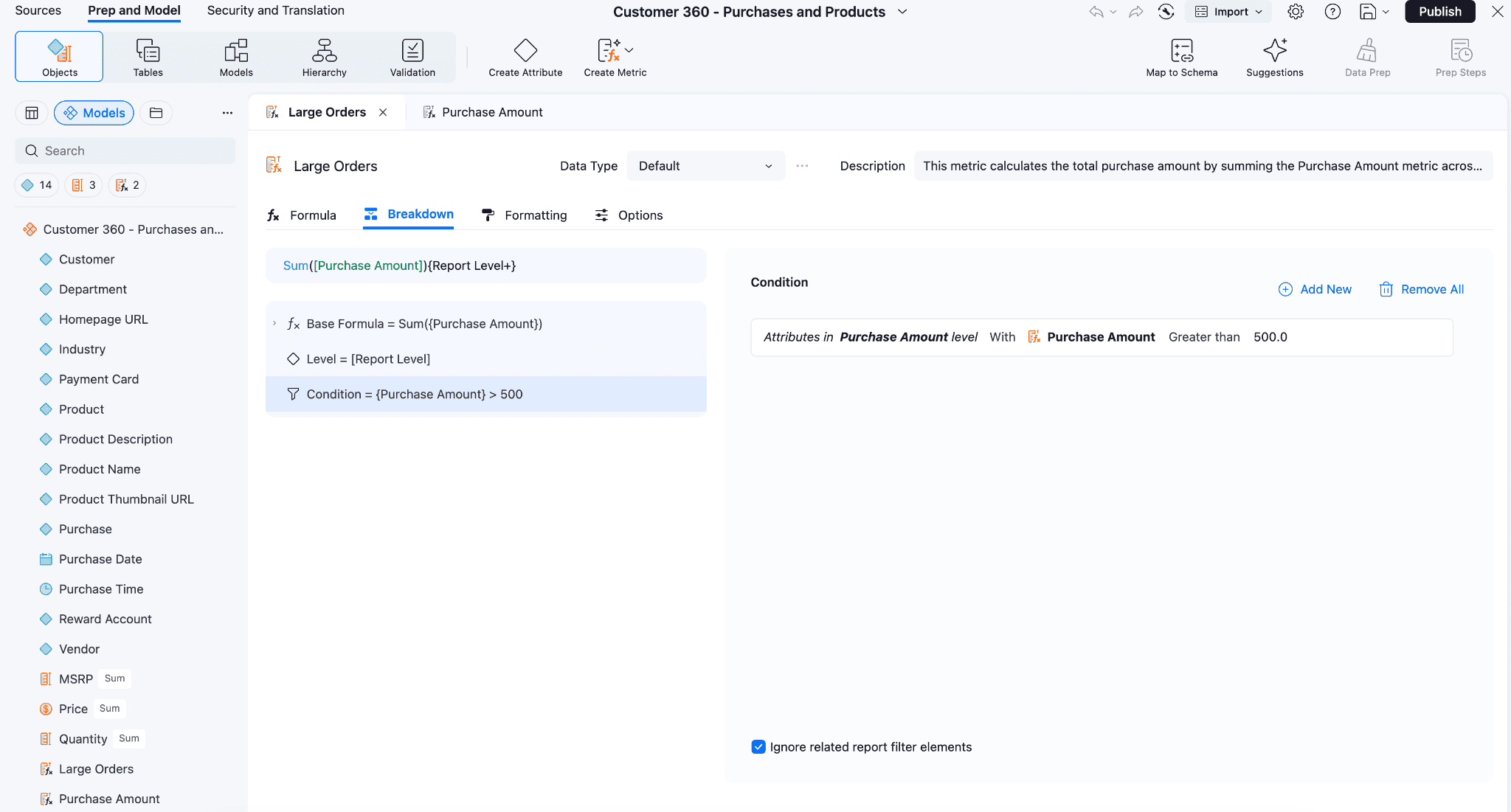
Figure 5: Advanced-metric authoring in Design Center, showing the base formula and the filter condition referenced from the Large Orders filter object.
Customer Lifetime Spend also needs a level qualifier, because lifetime means the whole history regardless of how the current question is sliced:
The ! before Customer sets grouping to none, so the metric returns each customer’s full total on every row rather than collapsing to one row per customer. See Strategy Metric Level Symbols for the full syntax.
Notice that [Big Spender] in the filter table qualifies on a metric expression rather than an attribute predicate. Filter objects can gate on either. Share of wallet is a compound metric, built from other metrics:
Levels and conditions carry through from the components unchanged. Share of wallet is a ratio, so it doesn’t add or average. The share across an AWS Region isn’t the average of each customer’s share, and the metric description tells the agent that. See Strategy Conditional Metrics.
Beyond base, advanced, and compound, Mosaic ships governed time-intelligence metrics as first-class expressions. Previous Year, Previous Quarter, Year-to-Date, and Quarter-to-Date are declared once on the model and preserved through slice, so a question like how does Sports spend this year compare with last year becomes an attribute pick and two metric references rather than a hand-written SQL date filter. Custom calendars attach at the model level, so the same year-over-year expression works for a fiscal year that ends in September and a calendar year that ends in December. See Governed Time-Intelligence Metrics in Mosaic.
Edit the filter object once and the Power BI dashboard, the SQL extract, and the agent all move together. That is what a named, governed model artifact gets you that an inline SQL predicate cannot.
How Mosaic plans and executes queries
The Mosaic engine parses each MCP query call as Trino-dialect SQL, resolves the dimensional references to the underlying Purchase and Customer models, applies the RLS or OLS that the caller is subject to, and plans physical SQL per source. The dialect matches what Strategy publishes for the MCP query tool, so the SQL the agent emits is portable across MCP clients connecting to the same certified model.
For the auto-enrollment question, planning unfolds like this:
- Push down to Amazon Aurora: a join of
customerandrewards_accountoncid, projecting profile andrewards_account.create_date, filtered where enrollment is null. Returns one row per unenrolled customer. - Push down to Amazon Redshift:
SUM(price * quantity)grouped bycid. Returns one row per customer with total spend. - Combine inside Mosaic: join the two intermediate result sets on
cid(the linking attribute), rank by lifetime spend, and return the top 20.
Aurora runs a transactional profile join. Amazon Redshift runs the fact aggregation. Mosaic handles the cross-engine join on a small intermediate set (one row per customer, not one row per order). A hand-written pipeline approximates the same shape and then must be kept in sync forever.
One SQL detail matters. Metrics are governed values, but Trino treats them as selected columns, so when a query uses GROUP BY, metrics need an aggregation wrapper such as SUM(metric_name). The metric’s definition, conditions, and join paths are still resolved by Mosaic. The outer aggregation is the caller’s. A non-additive ratio like share of wallet therefore needs to say so in its description.
Live pushdown or in-memory
Every Mosaic model runs in one of two modes.
| Mode | Behavior | Best fit |
| Live | Pushdown to Redshift or Aurora at query time | Consistently-current data. Source security applies directly |
| In-memory | Answered from a Mosaic-resident cube | Bounded recent windows. Predictable latency. No per-query warehouse compute |
Both modes enforce the same security rules. RLS and OLS are set once on the model and evaluated regardless of where the answer comes from. The choice is a performance and cost question.
Agent traffic is repetitive and bursty. An agent decomposing top spenders in Wisconsin into several exploratory follow-ups fires many small queries over the same recent slice. Serving that from memory turns variable per-query warehouse spend into fixed Mosaic capacity, and it’s usually faster. For interactive agent workloads over a bounded window, in-memory is often both quicker and cheaper. Configure Mosaic-side entitlements before switching a model to in-memory, and validate them in the same test pass you use to validate the numbers.
One definition, four interfaces
The metrics, attributes, hierarchies, and security rules built in the previous section reach every consumer through native protocols. No connector translation, no metric re-implementation, no drift.
| Protocol | Typical consumer | What it uses Mosaic for |
| MCP | AI agents (Strands, Claude, Copilot, ChatGPT, Gemini) | Semantic discovery + governed query |
| SQL / JDBC / ODBC (Trino) | Tableau, SQL clients, Python notebooks | Flexibility and ad-hoc analysis |
| DAX / XMLA | Power BI, Excel PivotTables | Semantic fidelity for BI |
| REST | Custom applications, data science | Programmatic access |
The same certified Mosaic model that the Strands agent in this walkthrough consumes also serves a business analyst working in Amazon Quick, which registers Mosaic MCP as an OAuth-authenticated connector. No second integration is required.
Governed access: Identity propagation and runtime enforcement
Mosaic enforces access in the semantic layer, before a query reaches Amazon Redshift or Aurora. HR and fraud roles see personally identifiable information (PII) fields like ssn and card_num. Marketing and analytics roles do not. Enforcement is identical whether the caller is a Strands agent over MCP, an analyst in Excel over XMLA, or a notebook over JDBC. One set of RLS and OLS objects, one certified-model gate, one privilege check. Attributes and metrics marked as sensitive also feed Mosaic Sentinel Risk Management, which alerts on queries that touch flagged objects and detects behavioral anomalies as a defense-in-depth layer next to OLS.
Figure 6 shows the identity propagation chain across two lanes: the front-door OAuth handshake that runs once per user, and the per-request path that runs on every agent tool call. Each lane carries the user’s identity end-to-end so Mosaic can enforce RLS and OLS on the caller rather than a service account.
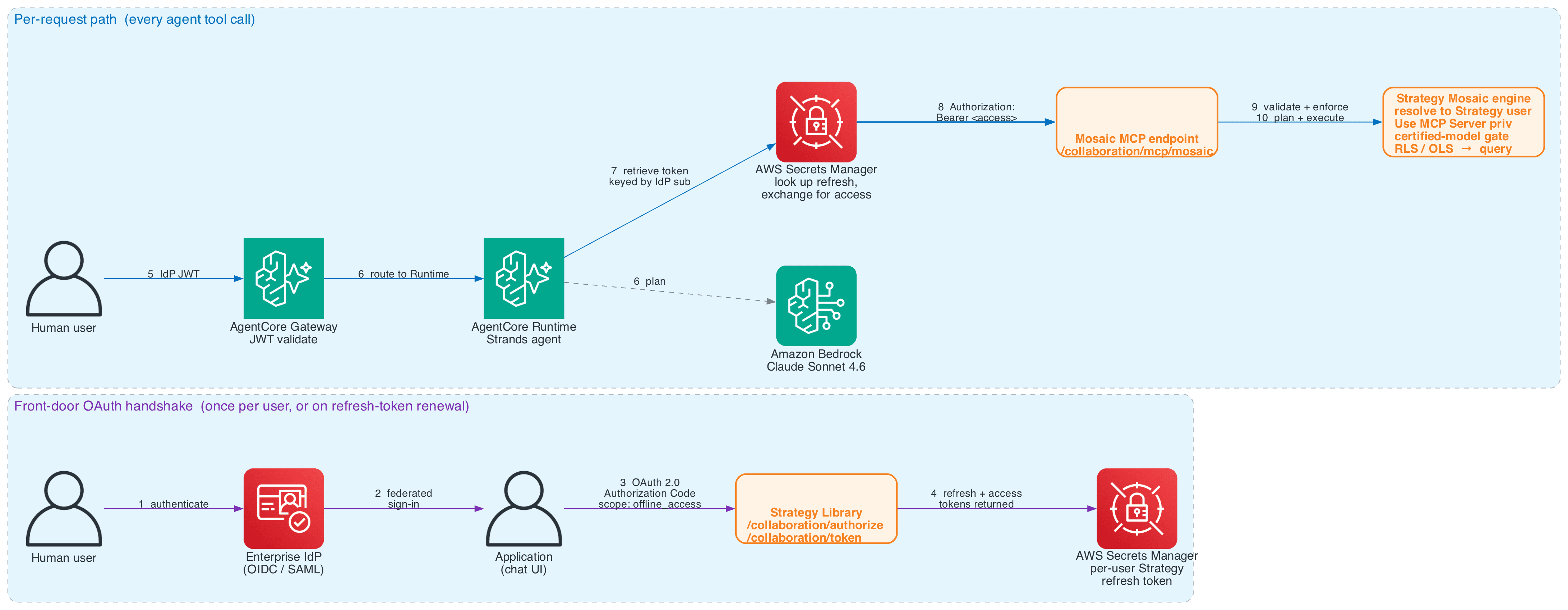
Figure 6: Identity propagation chain. The front-door OAuth handshake runs once per user, or on refresh-token renewal (steps 1-4). The per-request path runs on every agent tool call (steps 5-10). Nothing in the chain re-scopes to a service account. Mosaic evaluates governance on the caller’s Strategy user identity.
The chain follows two lanes.
Front-door OAuth handshake (once per user). The human user authenticates against the enterprise IdP. The application starts an OAuth 2.0 Authorization Code flow against Strategy Library at /collaboration/authorize with scope offline_access. Strategy Library, federated to the same IdP through SAML or OIDC, returns a refresh and access token pair at /collaboration/token. The app persists the refresh token to AWS Secrets Manager, keyed by the user’s IdP sub claim.
Per-request path (every agent tool call). AgentCore Gateway validates the IdP JWT and routes to AgentCore runtime, which hosts the Strands agent invoking Claude Sonnet 4.6 on Amazon Bedrock. The agent’s MCP tool retrieves the user’s refresh token from Secrets Manager, exchanges it for a fresh access token, and presents Authorization: Bearer to /collaboration/mcp/mosaic. Mosaic resolves the token to a Strategy user, enforces the Use MCP Server privilege, certified-model gate, and RLS and OLS, then plans and executes against Purchase and Customer. A marketing analyst doesn’t see ssn or card_num. A fraud analyst does.
Nothing in the chain re-scopes to a service account. Governance evaluates on the caller’s identity from IdP to Mosaic engine.
Expose the layer through the Mosaic MCP server
Strategy Library exposes two MCP endpoints:
| Endpoint | Path | What it does |
| Agents MCP | /collaboration/mcp/agent |
Routes a question to a certified Strategy agent, which answers using its own data and instructions |
| Mosaic MCP | /collaboration/mcp/mosaic |
Queries Mosaic models and AI-enabled cubes directly, no Strategy agent required |
Both work independently. This walkthrough uses Mosaic MCP. Putting the semantic layer directly in front of the Strands agent skips an inference hop.
The tool chain
Four tools, chained from project to model to semantics to query.
| Tool | What it does | Parameters |
get_projects |
Lists Strategy projects the caller can access | none |
get_models |
Lists certified Mosaic models and datasets in a project | project |
get_semantics |
Returns a model’s full definition: attributes and metrics with data types, descriptions, and metric formulas | model |
query |
Runs a read-only Trino SQL query. Writes and DDL rejected with MOSAIC_SQL_WRITE_REJECTED |
sql |
The agent chains these calls automatically. get_projects and get_models narrow to the right model by description before the agent reads a column name. get_semantics returns the governed definitions the agent then uses to compose SQL against real object names: Sports Share of Wallet as a compound metric, Customer Lifetime Spend scoped to Customer, the Category hierarchy, and the formula for every metric.
Two Mosaic-specific SQL conventions matter. Column identifiers follow a
 Shared by: AWS Machine Learning
October 20, 2026
Shared by: AWS Machine Learning
October 20, 2026
Leave a Reply