Implementing synthetic monitoring using Amazon Nova Act
Synthetic monitoring emulates real user journeys through automated transactions. Rather than waiting for customers to encounter problems, teams continuously validate critical workflows (logins, purchases, form submissions) on a scheduled basis. With this approach, you detect problems faster when performance degrades or UI interactions break.
For customer-facing businesses, especially in ecommerce, synthetic monitoring safeguards interactions that matter most. Organizations validate that product search works correctly, pricing and inventory display as expected, cart operations succeed, and checkout confirmations complete without error. Continuous testing identifies problems before customers encounter them.
The same approach applies across industries. Financial services organizations make sure account access and transaction flows remain functional. Travel and hospitality providers monitor booking and reservation journeys. Software as a service (SaaS) companies validate signup and subscription upgrade paths. Healthcare organizations monitor appointment scheduling portals where availability and transaction health are essential.
This post walks through an agent-driven approach to synthetic monitoring using Amazon Nova Act and Amazon Bedrock AgentCore. Together, with these services you can move beyond brittle UI scripts toward resilient, managed journey validation. The post describes the architecture and patterns for agent-driven synthetic monitoring, with a sample repository containing the complete implementation.
The challenge with traditional synthetic monitoring
Most organizations monitor infrastructure health through metrics, logs, traces, and API-level checks. However, high-impact failures often occur at the user journey level, where backend signals may not immediately reveal the problem. Common examples: a frontend deployment breaks a checkout button, a third-party login page changes unexpectedly, or a UI regression makes critical elements unresponsive.
Traditional browser automation frameworks like Selenium and Playwright rely on explicit Document Object Model (DOM) locators and selectors, which creates brittleness. Even small UI changes can break tests and require constant maintenance. Teams invest significant ongoing effort managing selectors, handling timing-related instability, and updating scripts as applications evolve, often spending more time on maintenance than on building new automations.
Traditional approach
Nova Act approach
Amazon Nova Act uses a multimodal large language model (LLM) that processes UI screenshots rather than DOM selectors, making it significantly more resilient to UI changes. Because the model reasons from what it sees on screen (not from CSS classes or element IDs), it adapts when styling changes without requiring script updates. In early enterprise customer use cases, Amazon Nova Act has demonstrated over 90% accuracy on browser workflows. This is a meaningful improvement over selector-based approaches that fail immediately on any element change. Teams should test on their own sites and design monitors with retry logic for cases where adaptation does not succeed.
Enterprise monitoring platforms compound the maintenance challenge by pricing browser checks as premium add-ons. This forces teams to choose between monitoring breadth and budget, all separate from the real goal of validating critical customer journeys.
Solution overview
This solution combines the following AWS services, each handling a distinct responsibility:
- Amazon Nova Act defines and executes UI workflows through natural-language actions combined with orchestration logic. It replaces selector-based scripts with vision and language reasoning.
- Amazon Bedrock AgentCore Runtime provides serverless execution with session isolation and stable invocation endpoints. It hosts the monitoring agent without requiring teams to manage servers or containers.
- AgentCore Browser tool, a capability of Amazon Bedrock AgentCore, provides a secure, isolated remote browser environment for each test run. It eliminates the overhead of operating browser farms.
- Amazon EventBridge Scheduler and Amazon Simple Notification Service (Amazon SNS) handle scheduling and alerting respectively, triggering tests on cadence and delivering failure notifications to subscribed endpoints.
Architecture
The architecture follows this flow:
- Amazon EventBridge Scheduler triggers synthetic monitoring runs on a defined schedule (every 5 minutes to hourly, depending on workflow criticality).
- Each scheduled invocation calls
InvokeAgentRuntimedirectly through the universal target capability of Amazon EventBridge Scheduler. - The agent executes within AgentCore Runtime, invoking Amazon Nova Act to drive the UI workflow using natural-language actions inside an AgentCore Browser session.
- If the journey fails at any step, the agent publishes a notification through Amazon SNS.
- Failures route immediately to subscribed endpoints (email, chat integrations, incident response tooling).
The following diagram illustrates the architecture.
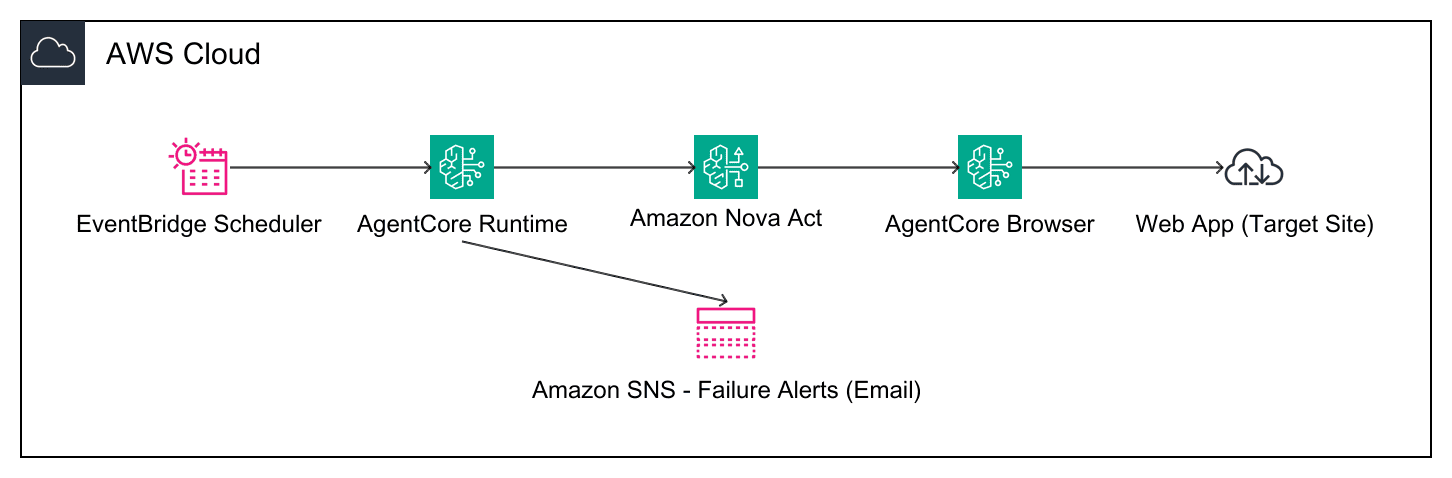
Figure 1: Synthetic monitoring architecture with Amazon Nova Act and Amazon Bedrock AgentCore
This architecture provides fully managed synthetic monitoring. Teams avoid maintaining brittle scripts or browser infrastructure.
Implementation
The following sections walk through setup requirements, journey definition, agent deployment, and scheduling infrastructure.
Prerequisites
Before implementing, confirm the following:
- An AWS account with access to Amazon Nova Act, Amazon Bedrock AgentCore (Runtime and Browser tool), Amazon Elastic Container Registry (Amazon ECR), IAM, Amazon EventBridge Scheduler, and Amazon SNS.
- Python 3.11 or later, Docker, and AWS Command Line Interface (AWS CLI) v2 configured with credentials.
- Node.js 18 or later and AWS Cloud Development Kit (AWS CDK) for the production infrastructure path (the standalone
deploy.pyscript is also provided). - An email address if you want
deploy.pyor CDK to create an SNS email subscription for alerts.
Defining a journey
Implementation begins by defining the most important customer journeys to validate. For ecommerce applications, these typically include homepage load, product search, product detail navigation, add-to-cart validation, and checkout readiness.
Rather than focusing only on workflow completion, validate outcomes explicitly. The monitor should confirm that search results appear correctly, the cart contains items, and no error banners display. Explicit outcome validation reduces false positives from incomplete checks and false negatives from overly permissive assertions.
Agent definition
The agent groups natural-language actions into logical journey steps and uses assertions at key checkpoints. Actions use act() to drive the UI through natural language. Assertions use act_get() with a boolean schema to validate outcomes. When a journey fails, the agent publishes the journey type, target URL, duration, completed steps, and failed steps. Detailed exception information remains in the runtime logs.
The code uses the Nova Act SDK directly. When deployed to AgentCore Runtime, the execution environment manages browser session lifecycle through the Browser tool. In testing, a typical six-step journey completes in 2 to 4 minutes depending on page load times. Refer to the Nova Act User Guide for current method signatures and SDK version. The sample repository includes the complete agent definition with error handling and single-attempt step execution.
Deploying the agent to AgentCore Runtime
Before the Amazon EventBridge schedule can invoke the agent, deploy it to AgentCore Runtime using the Nova Act CLI. The act workflow commands package the agent code, push the container image to Amazon ECR, and provision the runtime. Once deployed, the endpoint Amazon Resource Name (ARN) remains constant. Updates create new runtime versions without requiring you to update your Scheduler target.
The act workflow show command returns the AgentCore Runtime ARN that you reference as the Scheduler target. The sample repository’s deploy.py script wraps these commands with prerequisite checks (Docker, AWS credentials), creates the SNS alert topic, and wires the Amazon EventBridge schedule, so a single python deploy.py performs an end-to-end deployment. (AgentCore also provides its own agentcore CLI for agent development. This sample standardizes on the Nova Act act workflow commands.)
Deploying with CDK
For a production-grade, repeatable deployment, the sample includes a CDK stack as a standalone alternative to deploy.py. It provisions the Amazon EventBridge schedule with least-privilege IAM permission, the SNS alert topic, and an SQS dead-letter queue that captures failed InvokeAgentRuntime calls from the Scheduler.
The stack also creates two Amazon CloudWatch alarms: one on dead-letter-queue depth (failed Scheduler invocations), and one on missing scheduled runs (using the AWS/Scheduler InvocationAttemptCount metric, treating missing data as breaching). Note that these alarms detect infrastructure failures, such as a delivery failure to the agent or the schedule not firing. A functionally broken customer journey that still returns at the HTTP level surfaces through the agent’s SNS publish, not through these CloudWatch alarms.
Avoiding alert fatigue
Focus synthetic monitors on high-value customer journeys rather than exhaustive page coverage. Over-monitoring creates noise that desensitizes teams to real failures. Start with 3-5 critical workflows (login, checkout, account access) and expand based on actual failure patterns and business impact. Monitor journeys that directly affect revenue or customer trust, not every possible user path.
Similarly, avoid over-asserting on every page element. Validate meaningful outcomes (whether search results appear, whether the cart contains items) rather than checking every DOM element on the page. Overly granular assertions increase false positives without improving failure detection.
The sample agent code uses single-attempt execution per step, which minimizes Browser session cost. Since the natural language adaptation of Nova Act succeeds in approximately 90% of cases, a single-attempt approach may occasionally produce false alerts when Nova Act fails to locate a UI element that is actually present. Teams requiring lower false-positive rates can add step-level retry (re-run a failed step once before declaring failure) at the cost of longer session durations.
Operational considerations
Once deployed, two operational concerns require attention: observing the monitoring system itself and managing cost.
Monitoring the monitoring system
AgentCore Runtime publishes agent invocation metrics to Amazon CloudWatch, so you can track execution frequency and duration. On success, the agent completes without publishing to SNS. Journey failures surface through the agent’s SNS publish. Configure SNS topics with dead-letter queues to detect failed agent invocations.
Cost considerations
Costs come from five components: AgentCore Runtime invocations, Browser tool sessions, Nova Act inference, Amazon EventBridge Scheduler invocations, and SNS notifications. The primary cost drivers are Browser session duration and Nova Act inference calls per journey step.
The following table provides a cost approximation for the sample’s six-step ecommerce journey running every 5 minutes (approximately 8,640 invocations per month):
| Component | Usage per month | Estimated cost |
| AgentCore Runtime invocations | 8,640 sessions, approximately 2-4 minutes each | See pricing page |
| Browser tool sessions | 8,640 sessions, approximately 2-4 minutes each | See pricing page |
| Nova Act operations | ~207,360 action and assertion calls (24 per journey) | See pricing page |
| Amazon EventBridge Scheduler | 8,640 invocations | ~$0.009 See pricing page |
| SNS notifications | Failure alerts only (when configured) | Negligible See pricing page |
Solution benefits
Organizations adopting agent-driven synthetic monitoring with Nova Act and AgentCore can expect measurable improvements across key operational dimensions:
- Reduced script maintenance: Natural language actions replace the selector-update cycle. Teams no longer need to rebuild monitors after routine UI deployments.
- Faster mean-time-to-detect (MTTD): Continuous 5-minute cadence validation catches failures within minutes of deployment rather than after customer reports surface.
- Lower false-positive rates: Session isolation through Firecracker microVMs helps prevent state-leakage-induced false positives that plague shared-browser monitoring setups.
- Broader coverage at lower cost: Fully managed infrastructure (no browser farms, no server maintenance) allows teams to monitor more journeys without proportional increases in ongoing costs.
Security and compliance
Synthetic monitoring must produce reliable results without introducing false positives or masking real failures. AgentCore Runtime provides session isolation for each test execution using a strict one-session-one-microVM model built on Firecracker microVMs. By default, each session terminates with full memory sanitization, preventing cookies, browser cache, and LocalStorage from persisting between runs. This helps prevent false positives caused by state leakage across tests. For synthetic monitoring, ephemeral sessions are the recommended pattern to maintain test independence. AgentCore does offer persistent browser profiles through the SaveBrowserSessionProfile API for other use cases, but synthetic monitors should always use ephemeral sessions.
For network access, the Browser tool operates in public network mode by default, providing internet access appropriate for synthetic monitors that validate customer-facing websites. For environments requiring egress control, AgentCore supports Browser with Amazon Virtual Private Cloud (Amazon VPC) configuration, allowing teams to restrict network access to specific domains when monitoring internal applications.
Teams integrate synthetic monitoring with AWS Identity and Access Management (IAM) to enforce least-privilege permissions. IAM roles define which resources the agent can access, including SNS publishing permissions and Browser tool invocation.
When synthetic tests require authentication, teams should store credentials in AWS Secrets Manager, which keeps sensitive information encrypted and access is auditable through AWS CloudTrail.
Multi-Region deployment with infrastructure as code
Organizations with users around the world can deploy Nova Act synthetic monitoring in multiple AWS Regions to test user experiences from different geographic locations. This helps validate user experiences and identify issues across multiple Regions.
Use infrastructure as code (IaC) to deploy the solution consistently and repeatably across supported Regions. For current Region availability, see the Amazon Bedrock AgentCore and Amazon Nova Act product pages.
Clean up
To avoid ongoing charges from the resources created in this post, remove them when they are no longer needed:
- For the
deploy.pypath, runpython deploy.py --cleanupto stop scheduled invocations and remove the workflow and related sample resources. - For the CDK path, run cdk destroy to remove the CDK-managed schedule, SQS dead-letter queue, CloudWatch alarms, SNS topic, and IAM role.
- The CDK stack does not own the AgentCore Runtime. Delete the separately deployed workflow with
act workflow delete --name synthetic-monitoring-workflow.
Conclusion
Synthetic monitoring has traditionally required a tradeoff between brittle scripts and the ongoing effort needed to maintain them as applications change. Amazon Nova Act and Amazon Bedrock AgentCore reduce this burden. Nova Act uses natural-language actions that are more resilient to routine UI changes, while AgentCore Runtime provides the infrastructure to run workflows at scale.
For the complete working implementation, see the sample repository: github.com/aws-samples/sample-nova-act-synthetic-monitoring
Additional resources
- Implement automated smoke testing using Amazon Nova Act headless mode.
- Agentic QA automation using Amazon Bedrock AgentCore Browser and Amazon Nova Act.
- Amazon Nova Act SDK (preview): Path to production for browser automation agents.
- Accelerating software delivery with agentic QA automation using Amazon Nova Act.
- AgentCore Browser quickstart with Nova Act.
- Nova Act samples repository.
About the authors
 Shared by: AWS Machine Learning
September 28, 2026
Shared by: AWS Machine Learning
September 28, 2026
Leave a Reply