AWS Machine Learning

-

AWS Machine Learning wrote a new post on the site CYBERCASEMANAGER ENTERPRISES 1 year, 6 months ago
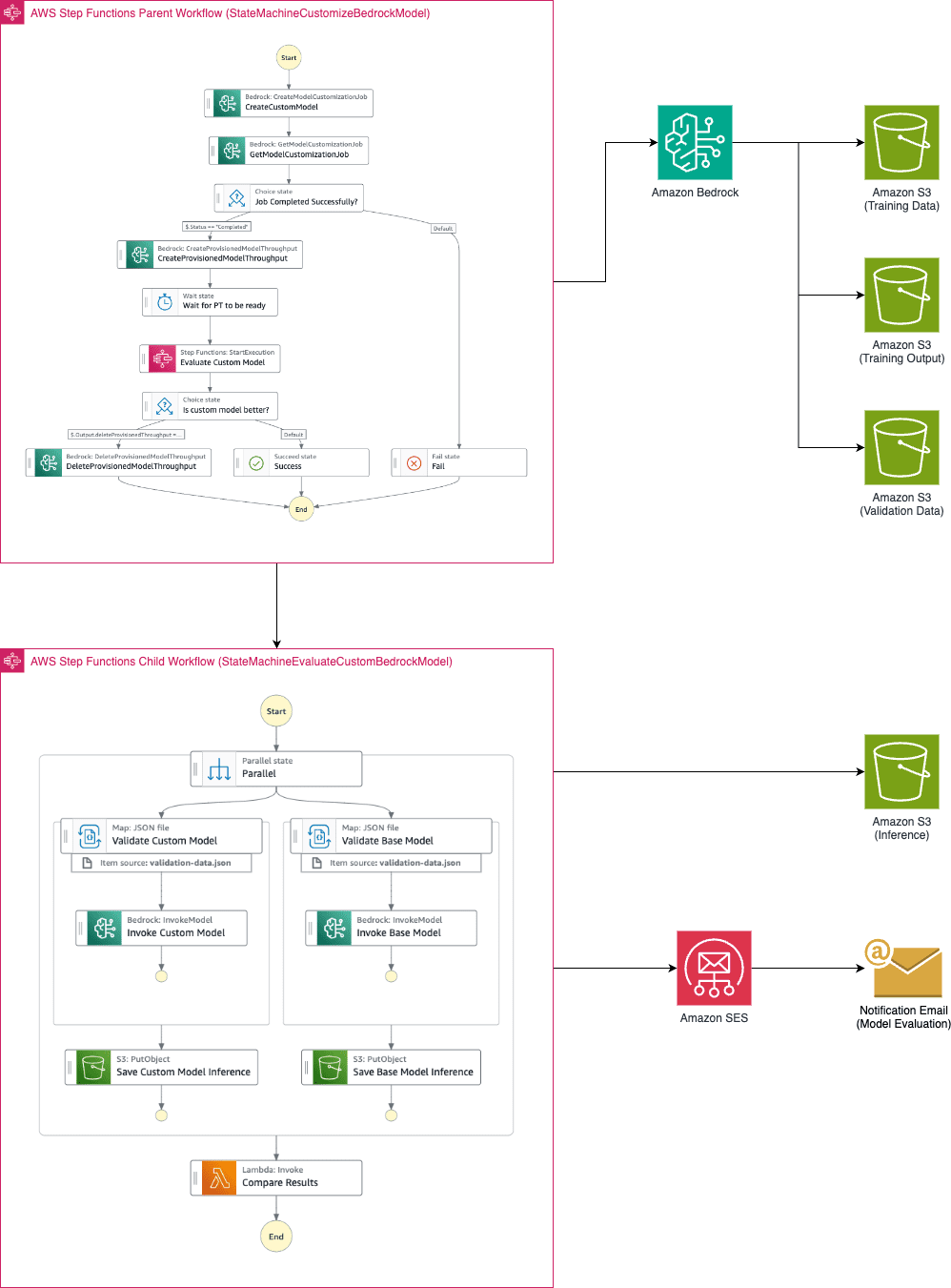
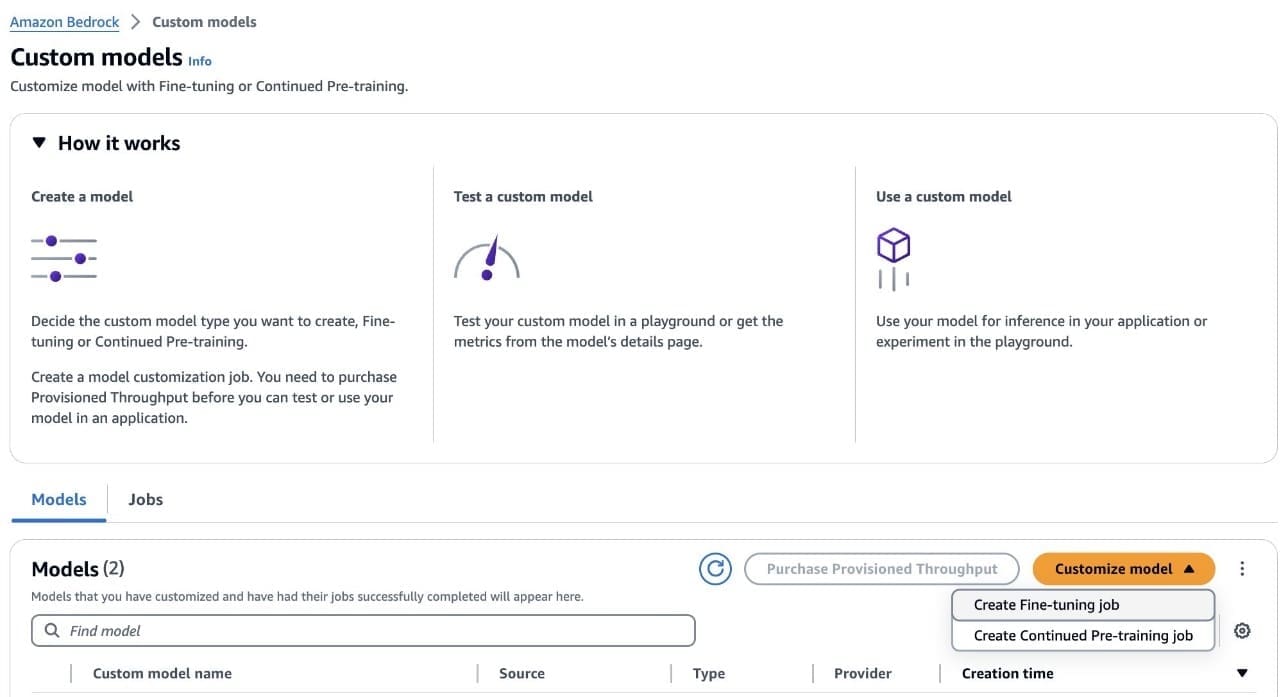
Automating model customization in Amazon Bedrock with AWS Step Functions workflow
Large language models have become indispensable in generating […] -
AWS Machine Learning wrote a new post on the site CYBERCASEMANAGER ENTERPRISES 1 year, 6 months ago
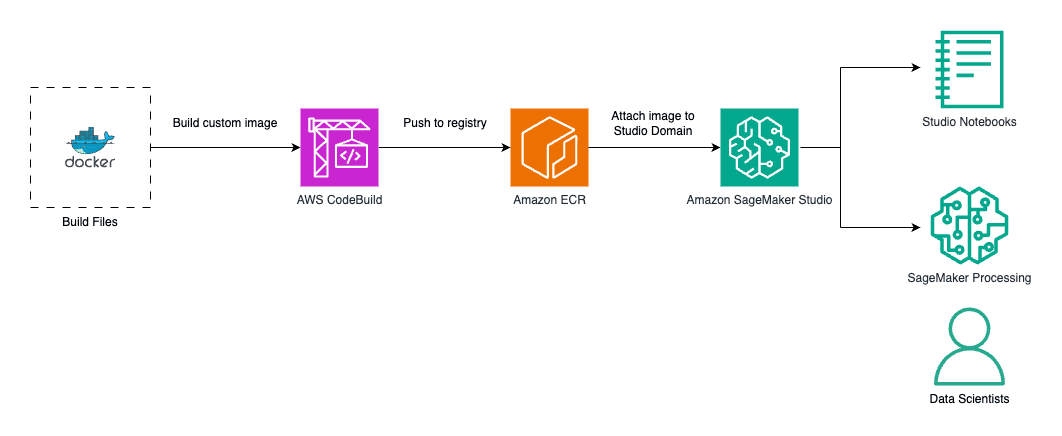
Create custom images for geospatial analysis with Amazon SageMaker Distribution in Amazon SageMaker Studio
Amazon SageMaker Studio provides a […] -
AWS Machine Learning wrote a new post on the site CYBERCASEMANAGER ENTERPRISES 1 year, 6 months ago
-
AWS Machine Learning wrote a new post on the site CYBERCASEMANAGER ENTERPRISES 1 year, 6 months ago
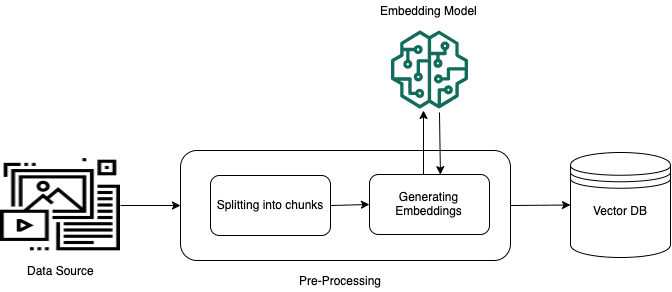
Improve RAG accuracy with fine-tuned embedding models on Amazon SageMaker
Retrieval Augmented Generation (RAG) is a popular paradigm that provides […] -
AWS Machine Learning wrote a new post on the site CYBERCASEMANAGER ENTERPRISES 1 year, 6 months ago
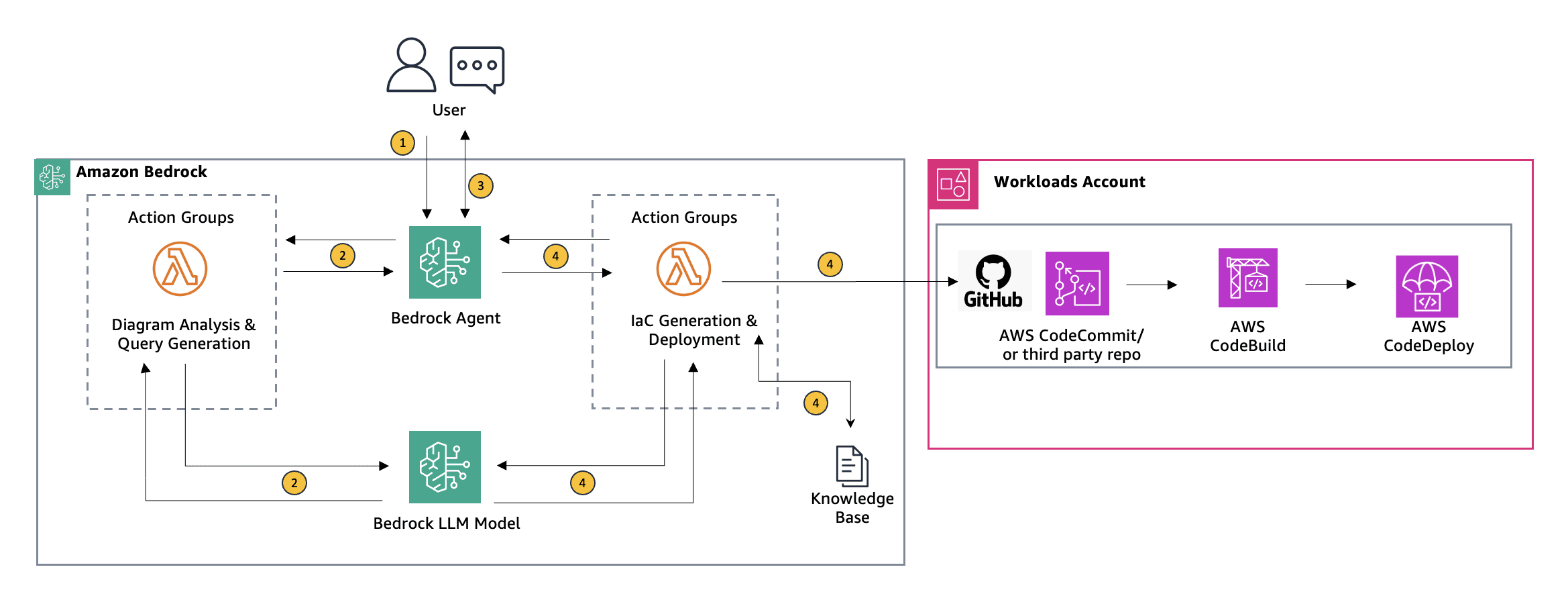
Using Agents for Amazon Bedrock to interactively generate infrastructure as code
In the diverse toolkit available for deploying cloud […] -
AWS Machine Learning wrote a new post on the site CYBERCASEMANAGER ENTERPRISES 1 year, 6 months ago
Achieve up to ~2x higher throughput while reducing costs by ~50% for generative AI inference on Amazon SageMaker with the new inference optimization toolkit – Part 1
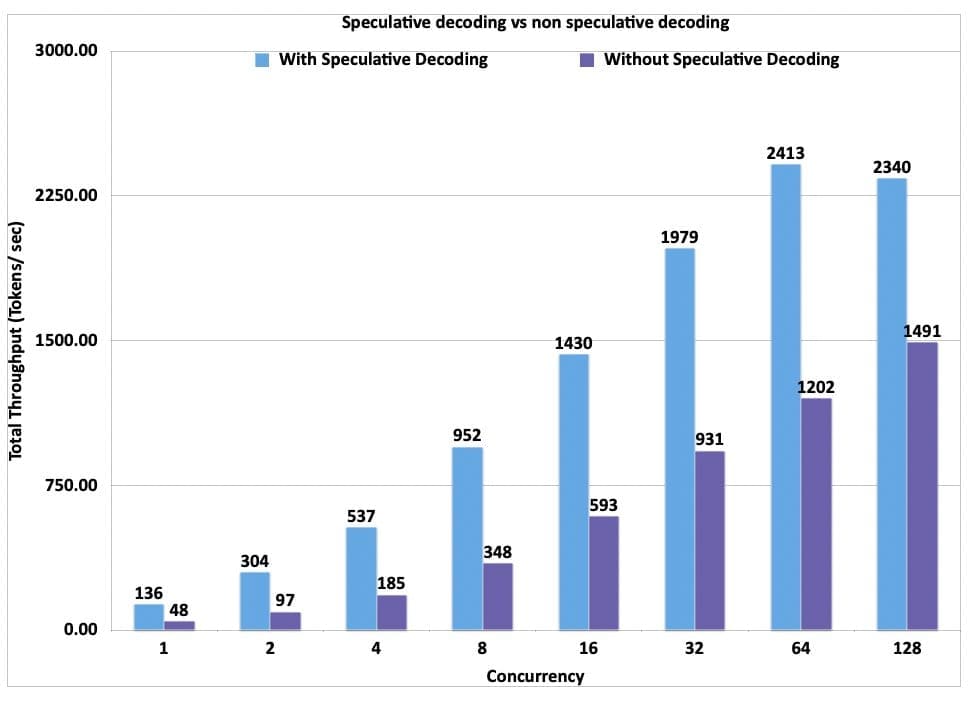
Today, Amazon SageMaker announced a new inference optimization toolkit that helps you reduce the time it takes to optimize generative artificial intelligence (AI) models from months to hours, to achieve best-in-class performance for your use case. With this new capability, you can choose from a menu of optimization techniques, apply them to your generative AI models, validate performance improvements, and deploy the models in just a few clicks. By employing techniques such as speculative decoding, quantization, and compilation, Amazon SageMaker’s new inference optimization toolkit delivers up to ~2x higher throughput while reducing costs by up to ~50% for generative AI models such as Llama 3, Mistral, and Mixtral models. For example, with a Llama 3-70B model, you can achieve up to ~2400 tokens/sec on a ml.p5.48xlarge instance v/s ~1200 tokens/sec previously without any optimization. Additionally, the inference optimization toolkit significantly reduces the engineering costs of applying the latest optimization techniques, because you don’t need to allocate developer resources and time for research, experimentation, and benchmarking before deployment. You can now focus on your business objectives instead of the heavy lifting involved in optimizing your models. In this post, we discuss the benefits of this new toolkit and the use cases it unlocks. Benefits of the inference optimization toolkit “Large language models (LLMs) require expensive GPU-based instances for hosting, so achieving a substantial cost reduction is immensely valuable. With the new inference optimization toolkit from Amazon SageMaker, based on our experimentation, we expect to reduce deployment costs of our self-hosted LLMs by roughly 30% and to reduce latency by up to 25% for up to 8 concurrent requests” said FNU Imran, Machine Learning Engineer, Qualtrics. Today, customers try to improve price-performance by optimizing their generative GenAI models with techniques such as speculative decoding, quantization, and compilation. Speculative decoding achieves speedup by predicting and computing multiple potential next tokens in parallel, thereby reducing the overall runtime, without loss in accuracy. Quantization reduces the memory requirements of the model by using a lower-precision data type to represent weights and activations. Compilation optimizes the model to deliver the best-in-class performance on the chosen hardware type, without loss in accuracy. However, it takes months of developer time to optimally implement generative AI optimization techniques—you need to go through a myriad of open source documentation, iteratively prototype different techniques, and benchmark before finalizing on the deployment configurations. Additionally, there’s a lack of compatibility across techniques and various open source libraries, making it difficult to stack different techniques for best price-performance. The inference optimization toolkit helps address these challenges by making the process simpler and more efficient. You can select from a menu of latest model optimization techniques and apply them to your models. You can also select a combination of techniques to create an optimization recipe for their models. Then you can run benchmarks using your custom data to evaluate the impact of the techniques on the output quality and the inference performance in just a few clicks. SageMaker will do the heavy lifting of provisioning the required hardware to run the optimization recipe using the most efficient set of deep learning frameworks and libraries, and provide compatibility with target hardware so that the techniques can be efficiently stacked together. You can now deploy popular models like Llama 3 and Mistral available on Amazon SageMaker JumpStart with accelerated inference techniques within minutes, either using the Amazon SageMaker Studio UI or the Amazon SageMaker Python SDK. A number of preset serving configurations are exposed for each model, along with precomputed benchmarks that provide you with different options to pick between lower cost (higher concurrency) or lower per-user latency. Using the new inference optimization toolkit, we benchmarked the performance and cost impact of different optimization techniques. The toolkit allowed us to evaluate how each technique affected throughput and overall cost-efficiency for our question answering use case. Speculative decoding Speculative decoding is an inference technique that aims to speed up the decoding process of large and therefore slow LLMs for latency-critical applications without compromising the quality of the generated text. The key idea is to use a smaller, less powerful, but faster language model called the draft model to generate candidate tokens that are then validated by the larger, more powerful, but slower target model. At each iteration, the draft model generates multiple candidate tokens. The target model verifies the tokens and if it finds a particular token is not acceptable, it rejects it and regenerates that itself. Therefore, the larger model may be doing both verification and some small amount of token generation. The smaller model is significantly faster than the larger model. It can generate all the tokens quickly and then send batches of these tokens to the target models for verification. The target models evaluate them all in parallel, significantly speeding up the final response generation (verification is faster than auto-regressive token generation). For a more detailed understanding, refer to the paper from DeepMind, Accelerating Large Language Model Decoding with Speculative Sampling. With the new inference optimization toolkit from SageMaker, you get out-of-the-box support for speculative decoding from SageMaker that has been tested for performance at scale for various popular open models. SageMaker offers a pre-built draft model that you can use out of the box, eliminating the need to invest time and resources in building your own draft model from scratch. If you prefer to use your own custom draft model, SageMaker also supports this option, providing flexibility to accommodate your specific custom draft models. The following graph showcases the throughput (tokens per second) for a Llama3-70B model deployed on a ml.p5.48xlarge using speculative decoding provided through SageMaker compared to a deployment without speculative decoding. While the results below use a ml.p5.48xlarge, you can also look at exploring deploying Llama3-70 with speculative decoding on a ml.p4d.24xlarge. The dataset used for these benchmarks is based on a curated version of the OpenOrca question answering use case, where the payloads are between 500–1,000 tokens with mean 622 with respect to the Llama 3 tokenizer. All requests set the maximum new tokens to 250. Given the increase in throughput that is realized with speculative decoding, we can also see the blended price difference when using speculative decoding vs. when not using speculative decoding. Here we have calculated the blended price as a 3:1 ratio of input to output tokens. The blended price is defined as follows: Total throughput (tokens per second) = (1/(p50 inter token latency)) x concurrency Blended price ($ per 1 million tokens) = (1−(discount rate)) × (instance per hour price) ÷ ((total token throughput per second)×60×60÷10^6)) ÷ 4 Check out the following notebook to learn how to enable speculative decoding using the optimization toolkit for a pre-trained SageMaker JumpStart model. The following are not supported when using the SageMaker provided draft model for speculative decoding: If you have fine-tuned your model outside of SageMaker JumpStart The custom inference script is not supported when using SageMaker draft models Local testing Inference components Quantization Quantization is one of the most popular model compression methods to reduce your memory footprint and accelerate inference. By using a lower-precision data type to represent weights and activations, quantizing LLM weights for inference provides four main benefits: Reduced hardware requirements for model serving – A quantized model can be served using less expensive and more available GPUs or even made accessible on consumer devices or mobile platforms. Increased space for the KV cache – This enables larger batch sizes and sequence lengths. Faster decoding latency – Because the decoding process is memory bandwidth bound, less data movement from reduced weight sizes directly improves decoding latency, unless offset by dequantization overhead. A higher compute-to-memory access ratio (through reduced data movement) – This is also known as arithmetic intensity. This allows for fuller utilization of available compute resources during decoding. For quantization, the inference optimization toolkit from SageMaker provides compatibility and supports Activation-aware Weight Quantization (AWQ) for GPUs. AWQ is an efficient and accurate low-bit (INT3/4) post-training weight-only quantization technique for LLMs, supporting instruction-tuned models and multi-modal LLMs. By quantizing the model weights to INT4 using AWQ, you can deploy larger models (like Llama 3 70B) on ml.g5.12xlarge, which is 79.88% cheaper than ml.p4d.24xlarge based on the 1 year SageMaker Savings Plan rate. The memory footprint of INT4 weights is four times smaller than that of native half-precision weights (35 GB vs. 140 GB for Llama 3 70B). The following graph compares the throughput of an AWQ quantized Llama 3 70B instruct model on ml.g5.12xlarge against a Llama 3 70B instruct model on ml.p4d.24xlarge.There could be implications to the accuracy of the AWQ quantized model due to compression. Having said that, the price-performance is better on ml.g5.12xlarge and the throughput per instance is lower. You can add additional instances to your SageMaker endpoint according to your use case. We can see the cost savings realized in the following blended price graph. In the following graph, we have calculated the blended price as a 3:1 ratio of input to output tokens. In addition, we applied the 1 year SageMaker Savings Plan rate for the instances. Refer to the following notebook to learn more about how to enable AWQ quantization and speculative decoding using the optimization toolkit for a pre-trained SageMaker JumpStart model. If you want to deploy a fine-tuned model with SageMaker JumpStart using speculative decoding, refer to the following notebook. Compilation Compilation optimizes the model to extract the best available performance on the chosen hardware type, without any loss in accuracy. For compilation, the SageMaker inference optimization toolkit provides efficient loading and caching of optimized models to reduce model loading and auto scaling time by up to 40–60 % for Llama 3 8B and 70B. Model compilation enables running LLMs on accelerated hardware, such as GPUs or custom silicon like AWS Trainium and AWS Inferentia, while simultaneously optimizing the model’s computational graph for optimal performance on the target hardware. On Trainium and AWS Inferentia, the Neuron Compiler ingests deep learning models in various formats such as PyTorch and safetensors, and then optimizes them to run efficiently on Neuron devices. When using the Large Model Inference (LMI) Deep Learning Container (DLC), the Neuron Compiler is invoked from within the framework and creates compiled artifacts. These compiled artifacts are unique for a combination of input shapes, precision of the model, tensor parallel degree, and other framework- or compiler-level configurations. Although the compilation process avoids overhead during inference and enables optimized inference, it can take a lot of time. To avoid re-compiling every time a model is deployed onto a Neuron device, SageMaker introduces the following features: A cache of pre-compiled artifacts – This includes popular models like Llama 3, Mistral, and more for Trainium and AWS Inferentia 2. When using an optimized model with the compilation config, SageMaker automatically uses these cached artifacts when the configurations match. Ahead-of-time compilation – The inference optimization toolkit enables you to compile your models with the desired configurations before deploying them on SageMaker. The following graph illustrates the improvement in model loading time when using pre-compiled artifacts with the SageMaker LMI DLC. The models were compiled with a sequence length of 8,192 and a batch size of 8, with Llama 3 8B deployed on an inf2.48xlarge (tensor parallel degree = 24) and Llama 3 70B on a trn1.32xlarge (tensor parallel degree = 32). Refer to the following notebook for more information on how to enable Neuron compilation using the optimization toolkit for a pre-trained SageMaker JumpStart model. Pricing For compilation and quantization jobs, SageMaker will optimally choose the right instance type, so you don’t have to spend time and effort. You will be charged based on the optimization instance used. To learn model, see Amazon SageMaker pricing. For speculative decoding, there is no optimization involved; QuickSilver will package the right container and parameters for the deployment. Therefore, there are no additional costs to you. Conclusion Refer to Achieve up to 2x higher throughput while reducing cost by up to 50% for GenAI inference on SageMaker with new inference optimization toolkit: user guide – Part 2 blog to learn to get started with the inference optimization toolkit when using SageMaker inference with SageMaker JumpStart and the SageMaker Python SDK. You can use the inference optimization toolkit on any supported models on SageMaker JumpStart. For the full list of supported models, refer to Optimize model inference with Amazon SageMaker. About the authors Raghu Ramesha is a Senior GenAI/ML Solutions Architect Marc Karp is a Senior ML Solutions Architect Ram Vegiraju is a Solutions Architect Pierre Lienhart is a Deep Learning Architect Pinak Panigrahi is a Senior Solutions Architect Annapurna ML Rishabh Ray Chaudhury is a Se […] -
AWS Machine Learning wrote a new post on the site CYBERCASEMANAGER ENTERPRISES 1 year, 6 months ago
Achieve up to ~2x higher throughput while reducing costs by up to ~50% for generative AI inference on Amazon SageMaker with the new inference optimization toolkit – Part 2
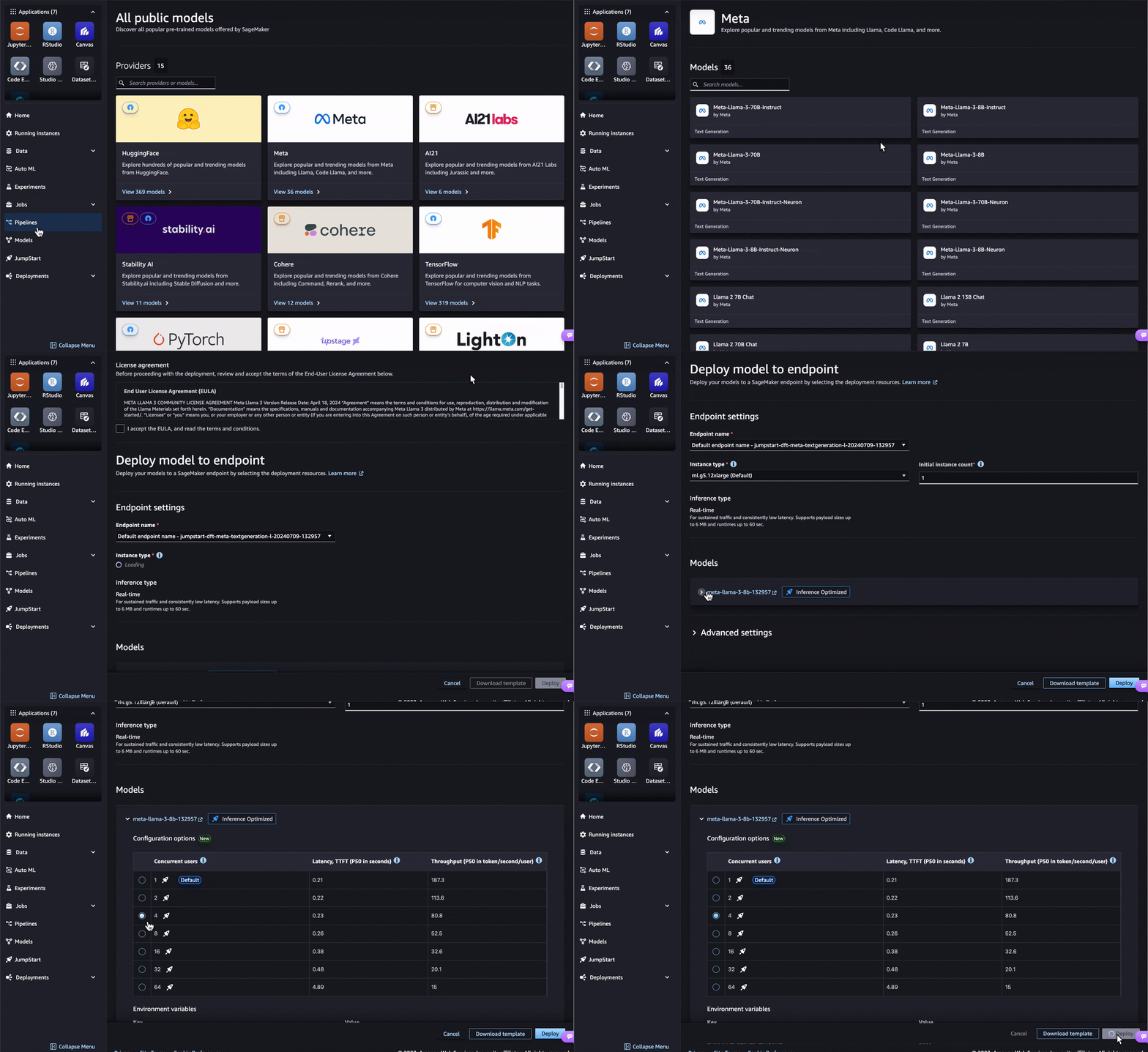
As generative artificial intelligence (AI) inference becomes increasingly critical for businesses, customers are seeking ways to scale their generative AI operations or integrate generative AI models into existing workflows. Model optimization has emerged as a crucial step, allowing organizations to balance cost-effectiveness and responsiveness, improving productivity. However, price-performance requirements vary widely across use cases. For chat applications, minimizing latency is key to offer an interactive experience, whereas real-time applications like recommendations require maximizing throughput. Navigating these trade-offs poses a significant challenge to rapidly adopt generative AI, because you must carefully select and evaluate different optimization techniques. To overcome these challenges, we are excited to introduce the inference optimization toolkit, a fully managed model optimization feature in Amazon SageMaker. This new feature delivers up to ~2x higher throughput while reducing costs by up to ~50% for generative AI models such as Llama 3, Mistral, and Mixtral models. For example, with a Llama 3-70B model, you can achieve up to ~2400 tokens/sec on a ml.p5.48xlarge instance v/s ~1200 tokens/sec previously without any optimization. This inference optimization toolkit uses the latest generative AI model optimization techniques such as compilation, quantization, and speculative decoding to help you reduce the time to optimize generative AI models from months to hours, while achieving the best price-performance for your use case. For compilation, the toolkit uses the Neuron Compiler to optimize the model’s computational graph for specific hardware, such as AWS Inferentia, enabling faster runtimes and reduced resource utilization. For quantization, the toolkit utilizes Activation-aware Weight Quantization (AWQ) to efficiently shrink the model size and memory footprint while preserving quality. For speculative decoding, the toolkit employs a faster draft model to predict candidate outputs in parallel, enhancing inference speed for longer text generation tasks. To learn more about each technique, refer to Optimize model inference with Amazon SageMaker. For more details and benchmark results for popular open source models, see Achieve up to ~2x higher throughput while reducing costs by up to ~50% for generative AI inference on Amazon SageMaker with the new inference optimization toolkit – Part 1. In this post, we demonstrate how to get started with the inference optimization toolkit for supported models in Amazon SageMaker JumpStart and the Amazon SageMaker Python SDK. SageMaker JumpStart is a fully managed model hub that allows you to explore, fine-tune, and deploy popular open source models with just a few clicks. You can use pre-optimized models or create your own custom optimizations. Alternatively, you can accomplish this using the SageMaker Python SDK, as shown in the following notebook. For the full list of supported models, refer to Optimize model inference with Amazon SageMaker. Using pre-optimized models in SageMaker JumpStart The inference optimization toolkit provides pre-optimized models that have been optimized for best-in-class cost-performance at scale, without any impact to accuracy. You can choose the configuration based on the latency and throughput requirements of your use case and deploy in a single click. Taking the Meta-Llama-3-8b model in SageMaker JumpStart as an example, you can choose Deploy from the model page. In the deployment configuration, you can expand the model configuration options, select the number of concurrent users, and deploy the optimized model. Deploying a pre-optimized model with the SageMaker Python SDK You can also deploy a pre-optimized generative AI model using the SageMaker Python SDK in just a few lines of code. In the following code, we set up a ModelBuilder class for the SageMaker JumpStart model. ModelBuilder is a class in the SageMaker Python SDK that provides fine-grained control over various deployment aspects, such as instance types, network isolation, and resource allocation. You can use it to create a deployable model instance, converting framework models (like XGBoost or PyTorch) or Inference Specs into SageMaker-compatible models for deployment. Refer to Create a model in Amazon SageMaker with ModelBuilder for more details. sample_input = { “inputs”: “Hello, I’m a language model,”, “parameters”: {“max_new_tokens”:128, “do_sample”:True} } sample_output = [ { “generated_text”: “Hello, I’m a language model, and I’m here to help you with your English.” } ] schema_builder = SchemaBuilder(sample_input, sample_output) builder = ModelBuilder( model=”meta-textgeneration-llama-3-8b”, # JumpStart model ID schema_builder=schema_builder, role_arn=role_arn, ) List the available pre-benchmarked configurations with the following code: builder.display_benchmark_metrics() Choose the appropriate instance_type and config_name from the list based on your concurrent users, latency, and throughput requirements. In the preceding table, you can see the latency and throughput across different concurrency levels for the given instance type and config name. If config name is lmi-optimized, that means the configuration is pre-optimized by SageMaker. Then you can call .build() to run the optimization job. When the job is complete, you can deploy to an endpoint and test the model predictions. See the following code: # set deployment config with pre-configured optimization bulder.set_deployment_config( instance_type=”ml.g5.12xlarge”, config_name=”lmi-optimized” ) # build the deployable model model = builder.build() # deploy the model to a SageMaker endpoint predictor = model.deploy(accept_eula=True) # use sample input payload to test the deployed endpoint predictor.predict(sample_input) Using the inference optimization toolkit to create custom optimizations In addition to creating a pre-optimized model, you can create custom optimizations based on the instance type you choose. The following table provides a full list of available combinations. In the following sections, we explore compilation on AWS Inferentia first, and then try the other optimization techniques for GPU instances. Instance Types Optimization Technique Configurations AWS Inferentia Compilation Neuron Compiler GPUs Quantization AWQ GPUs Speculative Decoding SageMaker provided or Bring Your Own (BYO) draft model Compilation from SageMaker JumpStart For compilation, you can select the same Meta-Llama-3-8b model from SageMaker JumpStart and choose Optimize on the model page. In the optimization configuration page, you can choose ml.inf2.8xlarge for your instance type. Then provide an output Amazon Simple Storage Service (Amazon S3) location for the optimized artifacts. For large models like Llama 2 70B, for example, the compilation job can take more than an hour. Therefore, we recommend using the inference optimization toolkit to perform ahead-of-time compilation. That way, you only need to compile one time. Compilation using the SageMaker Python SDK For the SageMaker Python SDK, you can configure the compilation by changing the environment variables in the .optimize() function. For more details on compilation_config, refer to LMI NeuronX ahead-of-time compilation of models tutorial. compiled_model = builder.optimize( instance_type=”ml.inf2.8xlarge”, accept_eula=True, compilation_config={ “OverrideEnvironment”: { “OPTION_TENSOR_PARALLEL_DEGREE”: “2”, “OPTION_N_POSITIONS”: “2048”, “OPTION_DTYPE”: “fp16”, “OPTION_ROLLING_BATCH”: “auto”, “OPTION_MAX_ROLLING_BATCH_SIZE”: “4”, “OPTION_NEURON_OPTIMIZE_LEVEL”: “2”, } }, output_path=f”s3://{output_bucket_name}/compiled/” ) # deploy the compiled model to a SageMaker endpoint predictor = compiled_model.deploy(accept_eula=True) # use sample input payload to test the deployed endpoint predictor.predict(sample_input) Quantization and speculative decoding from SageMaker JumpStart For optimizing models on GPU, ml.g5.12xlarge is the default deployment instance type for Llama-3-8b. You can choose quantization, speculative decoding, or both as optimization options. Quantization uses AWQ to reduce the model’s weights to low-bit (INT4) representations. Finally, you can provide an output S3 URL to store the optimized artifacts. With speculative decoding, you can improve latency and throughput by either using the SageMaker provided draft model or bringing your own draft model from the public Hugging Face model hub or upload from your own S3 bucket. After the optimization job is complete, you can deploy the model or run further evaluation jobs on the optimized model. On the SageMaker Studio UI, you can choose to use the default sample datasets or provide your own using an S3 URI. At the time of writing, the evaluate performance option is only available through the Amazon SageMaker Studio UI. Quantization and speculative decoding using the SageMaker Python SDK The following is the SageMaker Python SDK code snippet for quantization. You just need to provide the quantization_config attribute in the .optimize() function. optimized_model = builder.optimize( instance_type=”ml.g5.12xlarge”, accept_eula=True, quantization_config={ “OverrideEnvironment”: { “OPTION_QUANTIZE”: “awq” } }, output_path=f”s3://{output_bucket_name}/quantized/” ) # deploy the optimized model to a SageMaker endpoint predictor = optimized_model.deploy(accept_eula=True) # use sample input payload to test the deployed endpoint predictor.predict(sample_input) For speculative decoding, you can change to a speculative_decoding_config attribute and configure SageMaker or a custom model. You may need to adjust the GPU utilization based on the sizes of the draft and target models to fit them both on the instance for inference. optimized_model = builder.optimize( instance_type=”ml.g5.12xlarge”, accept_eula=True, speculative_decoding_config={ “ModelProvider”: “sagemaker” } # speculative_decoding_config={ # “ModelProvider”: “custom”, # use S3 URI or HuggingFace model ID for custom draft model # note: using HuggingFace model ID as draft model requires HF_TOKEN in environment variables # “ModelSource”: “s3://custom-bucket/draft-model”, # } ) # deploy the optimized model to a SageMaker endpoint predictor = optimized_model.deploy(accept_eula=True) # use sample input payload to test the deployed endpoint predictor.predict(sample_input) Conclusion Optimizing generative AI models for inference performance is crucial for delivering cost-effective and responsive generative AI solutions. With the launch of the inference optimization toolkit, you can now optimize your generative AI models, using the latest techniques such as speculative decoding, compilation, and quantization to achieve up to ~2x higher throughput and reduce costs by up to ~50%. This helps you achieve the optimal price-performance balance for your specific use cases with just a few clicks in SageMaker JumpStart or a few lines of code using the SageMaker Python SDK. The inference optimization toolkit significantly simplifies the model optimization process, enabling your business to accelerate generative AI adoption and unlock more opportunities to drive better business outcomes. To learn more, refer to Optimize model inference with Amazon SageMaker and Achieve up to ~2x higher throughput while reducing costs by up to ~50% for generative AI inference on Amazon SageMaker with the new inference optimization toolkit – Part 1. About the Authors James Wu is a Senior AI/ML Specialist Solutions Architect Saurabh Trikande is a Senior Product Manager Rishabh Ray Chaudhury is a Senior Product Manager Kumara Swami Borra is a Front End Engineer Alwin (Qiyun) Zhao is a Senior Software Development Enginee […] -
AWS Machine Learning wrote a new post on the site CYBERCASEMANAGER ENTERPRISES 1 year, 6 months ago
Fine-tune Anthropic’s Claude 3 Haiku in Amazon Bedrock to boost model accuracy and quality
Frontier large language models (LLMs) like Anthropic […] -
AWS Machine Learning wrote a new post on the site CYBERCASEMANAGER ENTERPRISES 1 year, 6 months ago
A progress update on our commitment to safe, responsible generative AI
Responsible AI is a longstanding commitment at Amazon. From the outset, we […] -
AWS Machine Learning wrote a new post on the site CYBERCASEMANAGER ENTERPRISES 1 year, 6 months ago
-
AWS Machine Learning wrote a new post on the site CYBERCASEMANAGER ENTERPRISES 1 year, 6 months ago
Streamline generative AI development in Amazon Bedrock with Prompt Management and Prompt Flows (preview)
Today, we’re excited to introduce two p […] -
AWS Machine Learning wrote a new post on the site CYBERCASEMANAGER ENTERPRISES 1 year, 6 months ago
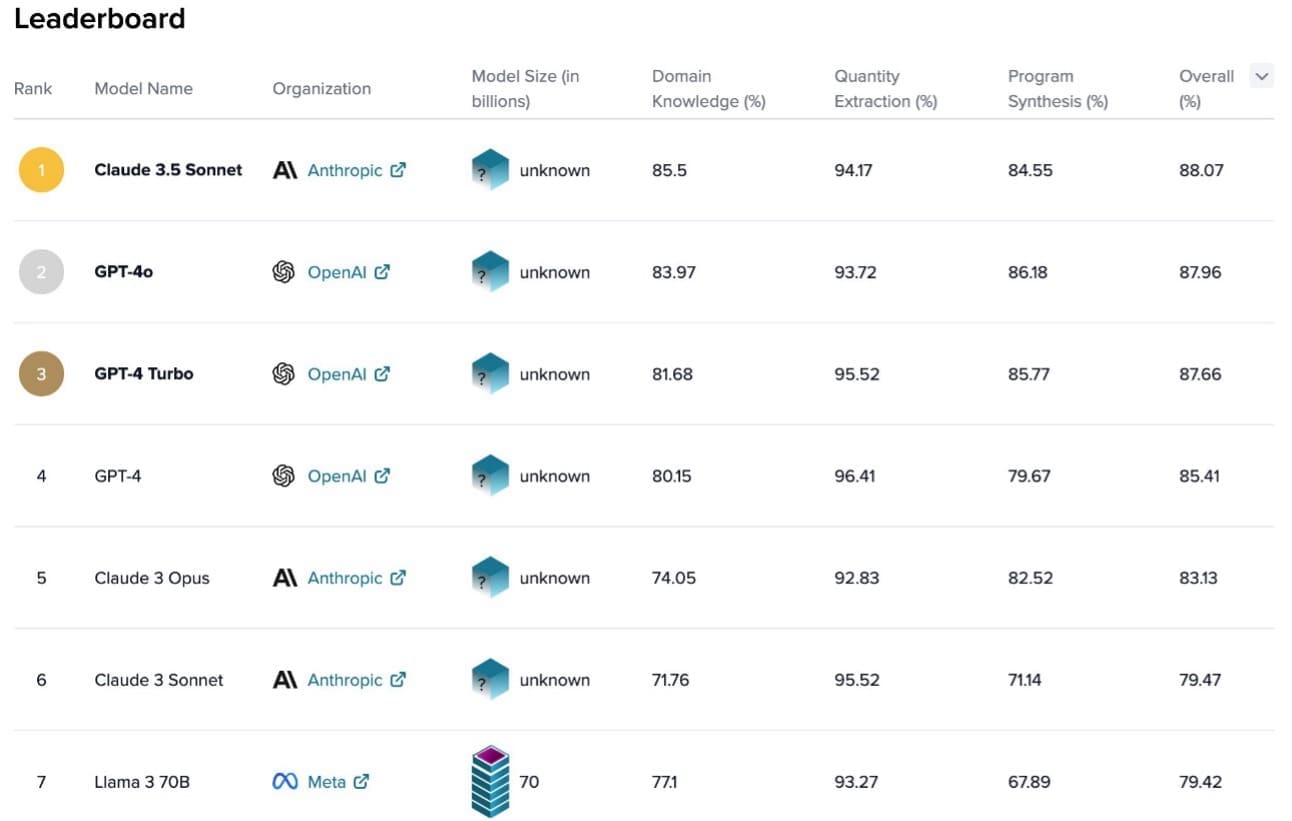
Anthropic Claude 3.5 Sonnet ranks number 1 for business and finance in S&P AI Benchmarks by Kensho
Anthropic Claude 3.5 Sonnet currently ranks at the […] -
AWS Machine Learning wrote a new post on the site CYBERCASEMANAGER ENTERPRISES 1 year, 6 months ago
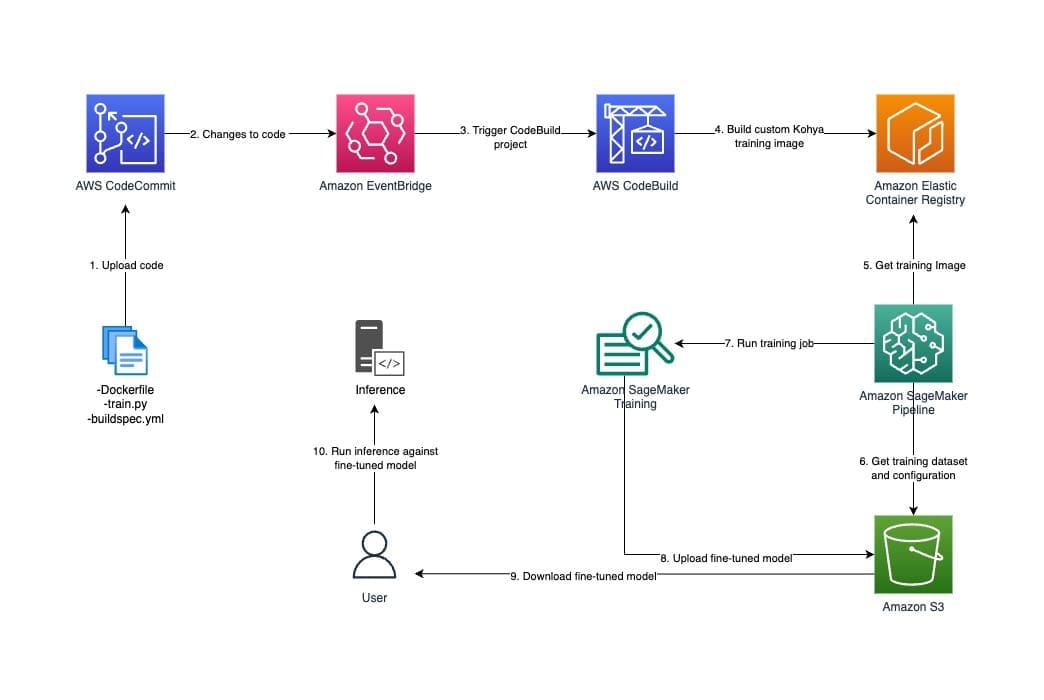
Generate unique images by fine-tuning Stable Diffusion XL with Amazon SageMaker
Stable Diffusion XL by Stability AI is a high-quality text-to-image […] -
AWS Machine Learning wrote a new post on the site CYBERCASEMANAGER ENTERPRISES 1 year, 6 months ago
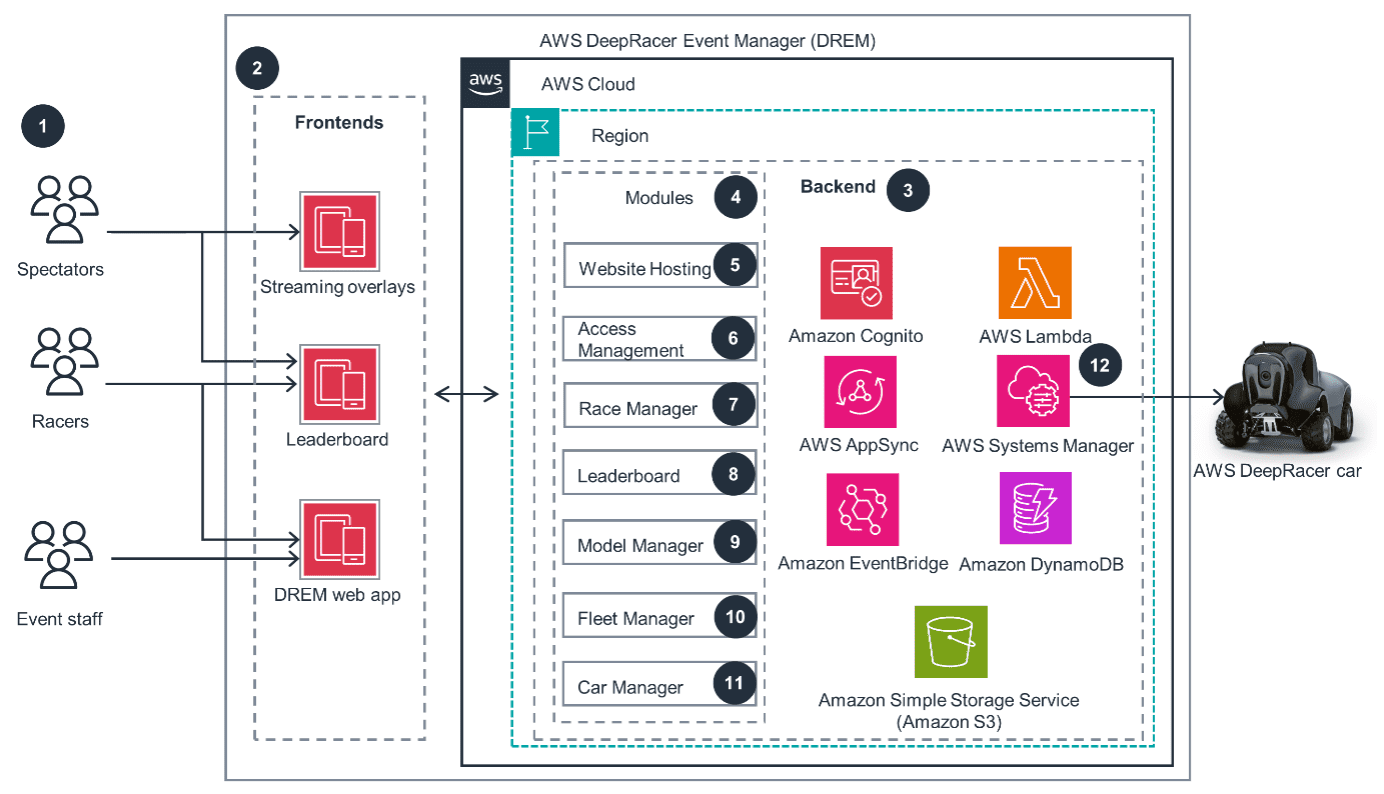
Eviden scales AWS DeepRacer Global League using AWS DeepRacer Event Manager
Eviden is a next-gen technology leader in data-driven, trusted, and […] -
AWS Machine Learning wrote a new post on the site CYBERCASEMANAGER ENTERPRISES 1 year, 6 months ago
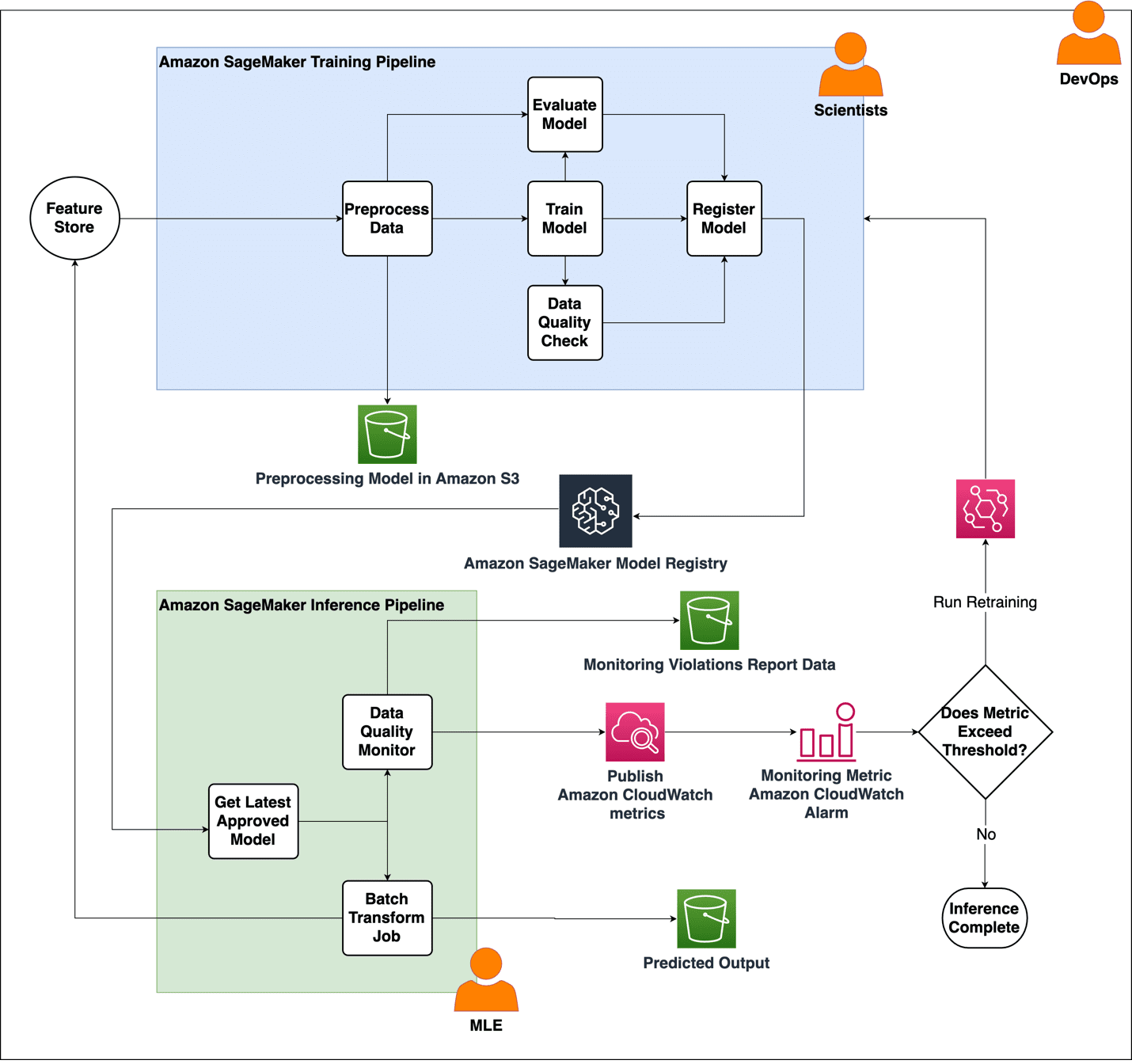
The Weather Company enhances MLOps with Amazon SageMaker, AWS CloudFormation, and Amazon CloudWatch
This blog post is co-written with Qaish […] -
AWS Machine Learning wrote a new post on the site CYBERCASEMANAGER ENTERPRISES 1 year, 6 months ago
Improve productivity when processing scanned PDFs using Amazon Q Business
Amazon Q Business is a generative AI-powered assistant that can answer […] -
AWS Machine Learning wrote a new post on the site CYBERCASEMANAGER ENTERPRISES 1 year, 6 months ago
Prompt engineering techniques and best practices: Learn by doing with Anthropic’s Claude 3 on Amazon Bedrock
You have likely already had the […] -
AWS Machine Learning wrote a new post on the site CYBERCASEMANAGER ENTERPRISES 1 year, 6 months ago
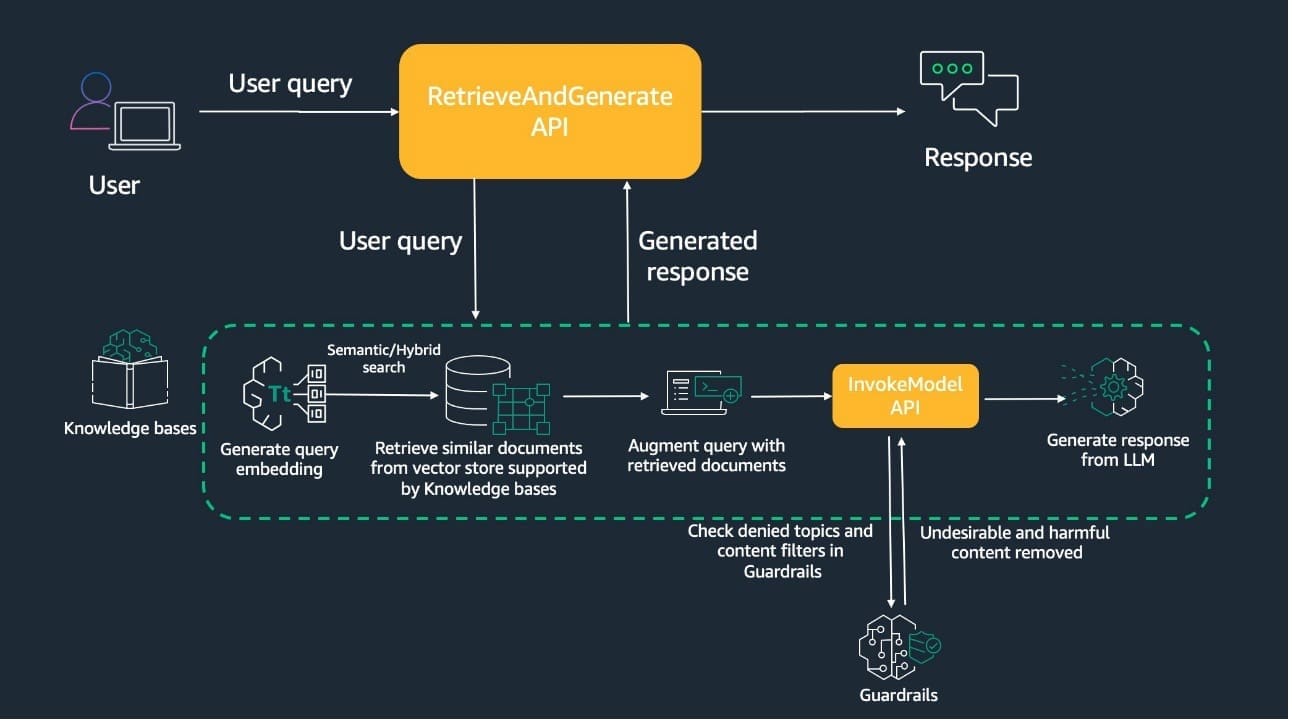
Introducing guardrails in Knowledge Bases for Amazon Bedrock
Knowledge Bases for Amazon Bedrock is a fully managed capability that helps you […] -
AWS Machine Learning wrote a new post on the site CYBERCASEMANAGER ENTERPRISES 1 year, 6 months ago
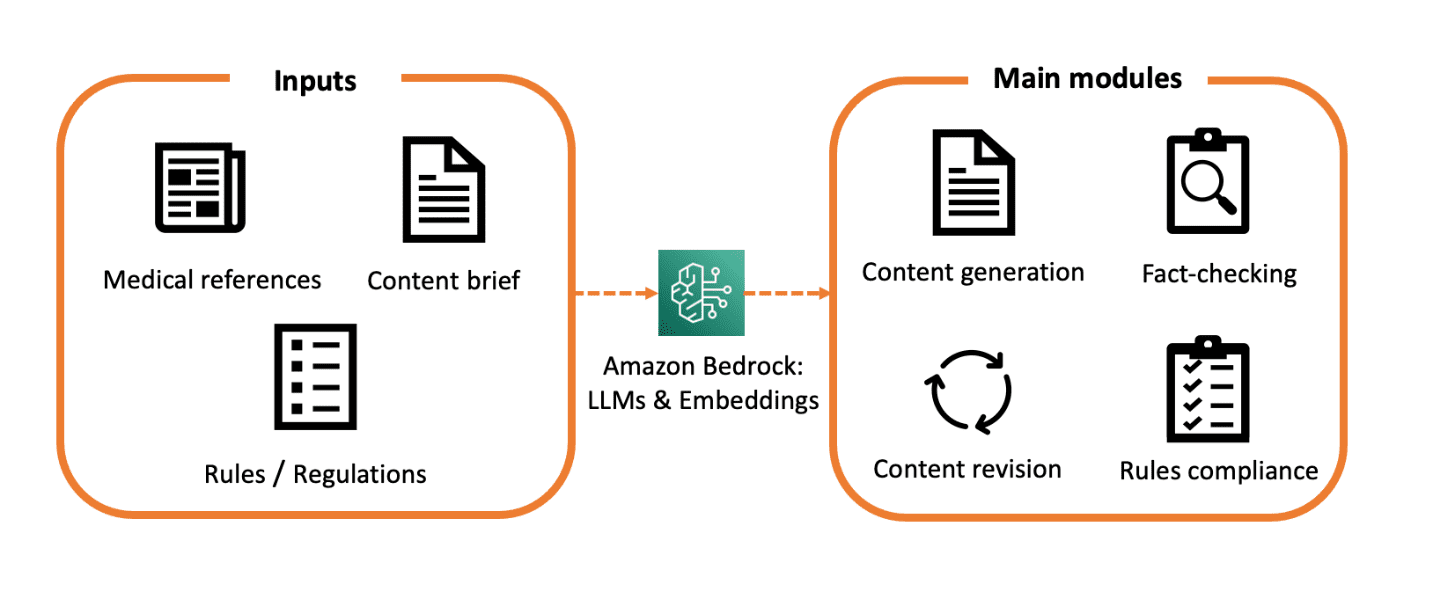
Medical content creation in the age of generative AI
Generative AI and transformer-based large language models (LLMs) have been in the top headlines […] -
AWS Machine Learning wrote a new post on the site CYBERCASEMANAGER ENTERPRISES 1 year, 6 months ago
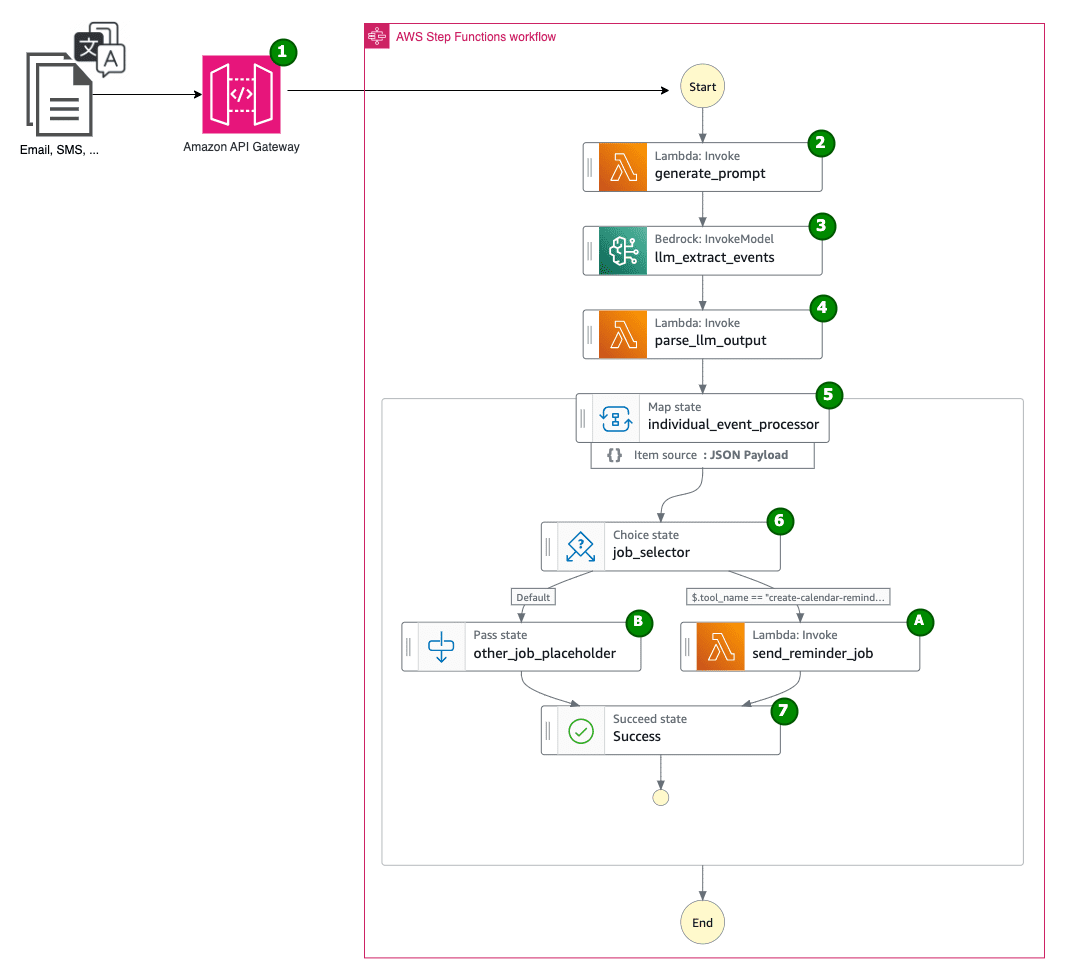
Build your multilingual personal calendar assistant with Amazon Bedrock and AWS Step Functions
Foreigners and expats living outside of their home […] - Load More